Showing posts with label Agile Framework. Show all posts

The Disciplined Agile Delivery Framework

Disciplined Agile® Delivery (DAD) is a people-first, learning-oriented hybrid agile approach to IT solution delivery. DAD addresses all aspects of the full delivery life cycle, supporting multiple ways of working (WoW) that can be tailored to the context that you face. DAD encompasses all aspects of agile software development in a robust, pragmatic, and governable manner.

Roles

  • Primary Roles. These roles are commonly found on DAD teams regardless of the level of scale faced by the team.
    • Stakeholder. Is someone who is materially impacted by the outcome of the solution. In this regard, the stakeholder is clearly more than an end-user.
    • Team Member. The role of the team member focuses on producing the actual solution for stakeholders (a.k.a. Developer in Scrum).
    • Team Lead. Servant leader of the team, creating and maintaining the conditions that allow the team to be successful. The team lead is also an agile coach, helping to keep the team focused on delivering work items and fulfilling their iteration goals and commitments that they have made to the product owner (a.k.a Scrum Master).
    • Product owner. Is the one individual on the team who speaks as the "one voice of the customer." He or she represents the needs and desires of the stakeholder community to the agile delivery team. As such, he or she clarifies any details regarding the solution and is also responsible for maintaining a prioritized list of work items that the team will implement to deliver the solution.
    • Architecture Owner. Is the person who owns the architecture decisions for the team and who facilitates the creation and evolution of the overall solution design. The person in the role of team lead will often also be in the role of architecture owner on small teams.
  • Supporting Roles. These are typically introduced, often on a temporary basis, to address scaling issues
    • Specialist. Although most agile team members are generalizing specialists, sometimes, particularly at scale, specialists are required.
      • For example, on large teams or in complex domains one or more agile business analysts may join the team to help you to explore the requirements for what you’re building.
    • Domain Expert (or subject matter expert). The product owner represents a wide range of stakeholders, not just end users, so it isn’t reasonable to expect them to be experts in every nuance in your domain, something that is particularly true with complex domains.
    • Technical Expert. Sometimes the team needs the help of technical experts, such as a build master to set up their build scripts, an agile database administrator to help design and test their database, a user experience (UX) expert to help design a usable interface, or a security expert to provide advice around writing a secure system.
    • Independent Tester. Although the majority of the testing is done by the people on the DAD team themselves, some DAD teams are supported by an independent test team working in parallel that validates their work throughout the life cycle.
    • Integrator. For large DAD teams which have been organized into a team of sub-teams, the sub-teams are typically responsible for one or more subsystems or features. The larger the overall team, generally the larger and more complicated the system being built. In these situations, the overall team may require one or more people in the role of integrator responsible for building the entire system from its various subsystems.

Notes about roles:

  • On a DAD team, any given person will be in one or more roles, an individual can change their role(s) over time, and any given role will have zero or more people performing it at any given time. 
  • Roles are not positions, nor are they meant to be.

Full Delivery Life Cycles

DAD, because it’s not prescriptive and strives to reflect reality as best it can, actually supports several versions of a delivery life cycle. Six versions of the life cycle are supported

Share:

The Fluid Teams

What are Fluid Scrum Teams?

Fluid Scrum Teams organize themselves based on the work at hand. It is a vital aspect of approaches like Open Space Technology and FAST Agile. 

  • Every time new topics need to be addressed, the people of the Fluid Scrum Teams organize themselves to optimize the chances of success of the challenges. 
  • They form smaller teams each Sprint to maximize their effectiveness.

Suppose your pool of people is 20, these people organize themselves into 2 to 7 teams to address specific topics.

Fluid Scrum Teams and Scrum events

  • Sprint Planning:
    • All the Developers that work on the product, the entire pool of people, are present. 
    • The Product Owner proposes a number of objectives for the upcoming Sprint. 
  • Sprint Objectives:
    • A discussion to agree upon the objectives.
    • People of the Fluid Scrum Team self-organize themselves around the objectives.
    • They decide how to split into multiple teams working on their own objectives during one Sprint.
  • Daily Scrum:
    • The teams have their own Daily Scrums.
  • Sprint Review.
    • There's one Sprint Review reflecting upon the outcome of the work of all the teams. 
    • In every Sprint, different teams will be formed to address the objectives.
  • Fluid Scrum Teams are cross-functional.
  • Fluid Scrum Teams and self-management

Team Types

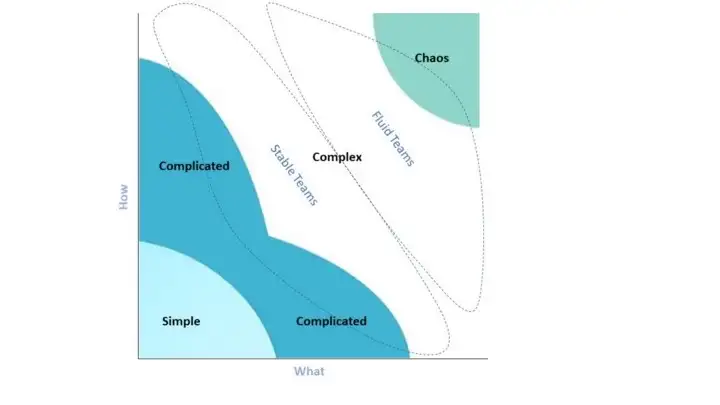
  • Complete fluidity.
    • In every Sprint, the teams that are formed can be totally different, depending on the problems at hand. 
    • This is a solution for environments that are especially complex and every new problem is distinctly different from previous problems.
  • Partial fluidity.
    • A part of the pool of people is working in stable steams addressing topics of a certain nature for multiple Sprints. 
    • Another part is fluid and organizes again and again. 
    • This approach is helpful for environments with elements of high complexity and also elements of lower complexity.
  • Specific fluidity.
    • A smaller group of people with special skills are assigning themselves to teams based on the need for their skills. 
    • Many organizations work like this. Especially when they have people that can’t work with a single team full-time. 
    • Think architects, database administrators, network specialists, and salespeople.
  • Fully stable teams.
    • The teams will not change for a longer period. 
    • In every Sprint, the teams have the same composition. 
    • This can be a good approach for environments that are complex, but with a high degree of predictability of the type of work at hand.

In complex environments, Fluid Scrum Teams can increase agility. By relaxing the constraint on stable teams, your teams will be able to handle increased complexity and tame the chaos.

References

Share:

The FAST Framework

FAST is the acronym for Fluid Scaling Technology. Fluid Scaling Technology combines OpenSpace Technology1 and Open Allocation to create a  lightweight, simple-to-understand, and simple-to-master method for organizing people around work - that scales.

Where and When to use FAST

  • FAST is ideally suited for business environments or challenges that show complexity, rapid change, or where there is a need for innovation. 
  • FAST is ideal for software development, product development, and agile at scale - because of their typically complex nature. 
  • FAST is applicable to most complex collaborative endeavors and is not limited to just the software domain.
  • FAST is built on fluid (re)teaming rather than static teams to maximize adaptability.
  • FAST is the same process at the small through to the large scale.
  • FAST is not built on Scrum. Instead, FAST is built on OpenSpace Technology.
  • FAST operates as a pure complex system
    • FAST also accommodates complicated and simple work.

FAST Roles

  • Product Manager
    • This role is not one of authority and command but more inspiration. 
    • Motivation, encouragement, communicating a clear vision, recommunicating the vision often, direction setting, standard-setting, providing feedback, and modern product management.
  • Team Members
    • A T-shaped team player committed to delivery, collaboration, communication, listening, continuous learning, and personal mastery.
    • Generalizing specialists.
  • Team Steward:
    • Natural leadership role where a Team Member has chosen to steward some work in a Value Cycle
    • Just as teams are fluid in FAST, team stewardship is fluid and not static.
  • Feature Steward (Optional):
    • As teams are not static in FAST, it can make sense for at least one person to stay with a feature/opportunity/outcome to see it all the way through to completion. 
    • Provide continuity across Value Cycles and serve as a point of contact for stakeholders. 
    • It is not required to work continuously on the feature they are stewarding, only to have a continuous understanding of the work.

FAST Artifacts

  • Product Map – The Big Picture.
    • It's an extension of Jeff Patton's Story Mapping (Patton). The difference is that a Product Map focuses on high-level elements only, e.g. bets, capabilities, opportunities, aspects, desired outcomes, business goals, initiatives, themes, and features.
    • It's s a way to visualize what the Collective is doing as a whole. The map shows progress at a high level by the ratio of started, not started, and done.
    • Finer-grained details of high-level items are represented in Discovery Trees.
  • Discovery Trees – Thinking Big While Working Small.
    • Whenever work starts on a high-level item, create a Discovery Tree. A Discovery Tree represents the complexity of work while giving context to work items.
    • Break down work to understand, discover, or plan. But only just enough and just in time. 
    • As work recursively gets broken down from a high-level item into smaller subcomponents, a structure of branch and leaf nodes reveals itself.
    • The current progress toward node completion is evident by the ratio of nodes started, not started, or completed (or removing completed nodes from the tree).
  • Marketplace Board.
    • It visually represents a marketplace of work for a Value Cycle. 
    • The board shows what is happening in the current Value Cycle and who is on which team. (The FAST Marketplace Board borrows from OpenSpace's Bulletin Board.)
    • Each column on the Marketplace Board might represent a physical collaboration area. 
    • To constrain work in progress (WIP), limit the number of places available in the Marketplace.
    • On the board, this might mean restricting or removing columns.
  • Collective Agreements – How We Self-manage
    • It's a living document that describes the rules and mechanics of self-management within the Collective. Collective Agreements create and protect harmony and psychological safety. At a minimum, it should include: 
      • How do we make decisions?
      • How do we resolve conflict?
      • How do we change the Collective's Agreements?
      • Where do we keep the Agreements?

FAST Meeting

The FAST Meeting is the only event in FAST and it is facilitated by the FAST Product Manager. The current Value Cycle is declared closed, and the next starts.

  • Phase 1: Closing the Current Value Cycle.
    • Collective Synchronisation via Show and Tell. A representative from each team briefly summarises their team's work in the last Value Cycle, highlighting value delivered and discoveries made. It includes concise demonstrations if helpful.
    • Once all teams have completed their show and tell, the Value Cycle is closed.
    • Clear the Marketplace Board in readiness to repopulate again in the next Value Cycle.
  • Phase 2: Starting the Next Value Cycle
    • Reiterate Vision and Set Direction
    • Each FAST Meeting is an opportunity for the Product Manager to align, rally, and reinspire the Collective by reiterating the product vision, mission(s), and purpose. In addition, the Product Manager may choose to set priorities or direction for the Value Cycle. 
    • The Product Map can be a useful visual aid for this, and why having it on permanent display in the forum is recommended. 
  • Phase 3: Emerging Work & Self-selecting into Teams.
    • Create and Open the Marketplace.
    • Any Member can stand up in front of the Collective and declare their intent to steward a goal. The goal may be related to priorities just announced. Or not.
    • Once volunteers have stopped coming forward to steward work or the WIP limit has been reached, the Marketplace is declared open.
    • Collective Members then self-select into whichever team they feel they can contribute the most value to, or learn and grow the most from. 
    • Members go to the Marketplace Board and put their names into the slot associated with the goal they are interested in working on for that cycle.
    • Teams might be a component, feature, discovery team, or other, dependent on the work.
    • Teams have the autonomy to do whatever they feel is the best and right thing needed to add value.
  • Announcements (Optional)
    • The Collective being gathered is an opportunity to make announcements. Announcements may be unrelated to work in the Value Cycle but are still relevant to the Collective.
  • Starting Work - Resolve Dependencies, Architect, Design, Plan, and Collaborate.
    • The dynamically formed teams now go to their chosen development area and plan. Each team tasks out their work and agrees on how they will collaborate. Should a team identify that they are likely to clash with another team or have dependencies, they meet with the other team(s) and discuss. To resolve dependencies or clashes, they might:
      • Merge.
      • Pick up some other work.
      • Have a design discussion, then plan if and how to divide labor.
      • Resolving dependencies this way can happen at any point in the cycle.

FAST Cadence and Flow

  • Synchronize the Collective to a shared understanding (via show and tell).
  • The pause between cycles is a sensing point to adjust teams, or work items should a better fit make sense. What was discovered in the last cycle? Has our understanding of the work or customer changed? Did any metrics change? Etc.
  • Revisit the purpose and vision of the product and company. Repetition, repetition... 
  • Cycles are not time boxes. Sign-off can happen at any point. Therefore, continuous delivery/deployment is a compatible natural fit and highly recommended for FAST.

FAST Adoption

FAST is a method that works on a small scale, large scale, and everything in between. It is the same process throughout, with only a few minor differences. A Collective is typically responsible for only one product or value stream in its entirety, but multiple products for a Collective are feasible. In the case of multiple products, the Product Manager can be singular or plural.
  • Small-scale FAST – Fewer Than 14 People. 
    • Use small-scale FAST when a Team has (roughly) fewer than fourteen people. 
    • Small-scale FAST can replace/supersede Scrum.
    • The collaboration units that Collective breaks into are smaller than in large-scale FAST. 
    • The smallest collaboration unit in small-scale FAST is two people, and pair programming is recommended when two. 
    • Mob Programming (Pearl) works well for collaboration units larger than two people.
  • Large-scale FAST – 14 to 200 People. 
    • Large-scale FAST is for a Collective of around fourteen or more people.
    • Collaboration units are typical agile software team sizes, e.g. 3-13 people.
    • Once a Collective grows too far past Dunbar's number (150), split and spin off a new Collective.
  • FAST Portfolio describes multiple Collectives. 
    • Working in this mode, FAST Product Managers meet for portfolio discussions.

FAST in Enterprise

  • FAST can integrate with other enterprise methods such as BOSSA nova, FLEX, and SAFe.

FAST Continuous Improvement.

  • FAST is not prescriptive on methods for implementing the principle of reflect and tune.
  • Each Collective should experiment and discover what works best. Some ideas and options:
    • Form a FAST Guild that meets on cadence to reflect and tune.
    • Host regular OpenSpace Events for the Collective with the theme Reflect and Tune.
    • Add a Turn Up the Good section to the FAST Meeting.

References

Share:

The Scrum Framework

The Scrum framework is defined in The Scrum Guide and was introduced as a better way of team collaboration for solving complex problems. The Scrum framework is fairly simple being made up of a Scrum Team consisting of a Product Owner, a Scrum Master, and Developers, each of which has specific accountabilities. 

The Scrum Team takes part in five events and produces three artifacts. The Scrum Guide contains the definition of Scrum,  describing the Scrum accountabilities, events, artifacts, and the guidance that binds them together.

Scrum Accountabilities 

  • Scrum Master: The person on the Scrum Team who uses their knowledge of Scrum to help the team and organization to be as effective as they can be; they do so by taking approaches like coaching, teaching, facilitating, and mentoring
  • Product Owner: The person on the Scrum Team who makes sure that the team is creating the most valuable product they can create.
  • Developers - the people on the Scrum Team who work together to create the product.

Scrum Events

  • Sprint: Short cycles of one month or less, during which the work is done; the Sprint contains all of the other Scrum events; a new Sprint starts immediately after the conclusion of the previous Sprint
  • Sprint Planning: The event is dedicated to planning out the work that will take place during the Sprint
  • Daily Scrum: The event is held every day where the Developers inspect the progress toward the Sprint Goal, uncover anything that may be getting in their way and adapt accordingly
  • Sprint Review: The event is held at the end of the Sprint where the Scrum Team and key stakeholders review what was accomplished in the Sprint and what has changed in their environment; next, attendees collaborate on what to do next
  • Sprint Retrospective: The Scrum Team gets together during this event to talk about how the last Sprint went and identify the most helpful changes to improve their effectiveness

Scrum Artifacts

  • Product Backlog - an evolving, ordered list of what is needed to improve the product; it is the single source of work undertaken by the Scrum Team
    • Commitment: Product Goal -  the target the team plans against 
  • Sprint Backlog - a highly visible list of work that is the Developer’s plan for Sprint, which may evolve as they learn
    • Commitment: Sprint Goal - the single objective of the Sprint
  • Increments - small pieces of work that serve as concrete stepping stones toward the Product Goal. You can deliver as often as needed during the Sprint and are not limited to only one release per Sprint.
    • Commitment: Definition of Done -  the description of what it takes for an Increment to be considered complete

References

Share:

The Kanban Method

With Kanban, you can manage work. It is a method to manage all types of professional services, also referred to as knowledge work.

Using the Kanban method means applying a holistic way of thinking about your services with a focus on improving them from your customers' perspective.

Kanban is not a methodology nor a process framework. Rather, it is a management method or approach that should be applied to an existing process or way of working.

STATIK

The STATIK approach should be applied to each service. It will result in a full Kanban system design. Throughout the process, systems thinking should be applied. The (future) system is always considered as a whole, with the goal of improving the flow of value to customers.

Kanban Boards

Kanban boards are the most common means of visualizing a Kanban system. 
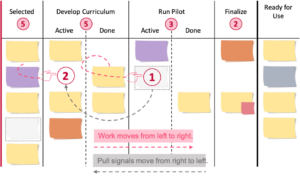
  • Common to all boards is pulling work from left to right through the board: on the left, new work items enter the board. When they exit on the right, value is delivered to customers.
  • There is at least one clear commitment and delivery point and a representation of the permitted amount of work (Work in progress, WIP).
  • Work Items can be of different types and sizes, from tasks to requirements, types of artifacts, (groups of) product features and topics to projects or product packages on higher-level boards.
  • Work items are typically displayed on individual (paper) notes, which are usually called cards or tickets.
  • The series of activities these work items go through is referred to as Workflow. Kanban is based on the "Start where you are now" approach, so, the actual workflow (not a wishful future image) is being modeled on the Kanban board.
  • The individual steps in the workflow and buffers are shown in columns.
  • Lanes are often used for different work types, projects, etc. to distribute capacity.
  • The workflow is modeled on the board. Different colored notes can be used, for example, to represent different types of work items.
  • The flow of work and its risks should be realistically shown in their true current state rather than a wishful image of the future at all times.

WIP Limits and Pull

The so-called WIP limit, i.e., the maximum number of work items allowed at a time, can be defined per work state(s), per person, per lane, per type of work, for a whole Kanban system, etc. WIP limits are typically represented by a number in a circle, above the respective columns.
  • Limiting the work that is allowed to enter the system is an important key to reducing delay and context switching which may result in poor timeliness, quality, and potential waste.
  • The aim is to create a balance between demand and capability over time.
  • Limiting the work that is allowed to enter the system also creates a continuous flow of work in which drawing or "pulling" work only happens if there is capacity. 
  • A virtual pull signal is generated when the WIP limit is not fully utilized. While work on the board moves to the right, pull signals move to the left, further upstream.

Core Kanbas Metrics

  • Lead time is the time it takes for a single work item to pass through the system from the start (commitment point) to completion.
  • Delivery rate is the number of completed work items per unit of time, such as features per week, training classes per month, or new hires per month.
  • WIP (work in progress) is the number of work items in the system (or a defined part of it) at a certain point in time.
  • Cumulative flow diagram (CFD). It is useful information regarding the flow of work across multiple activities. The colored areas in the diagram represent the number of work items within a particular activity in the workflow and how these work items move across all activities, from top to bottom, over time until done.

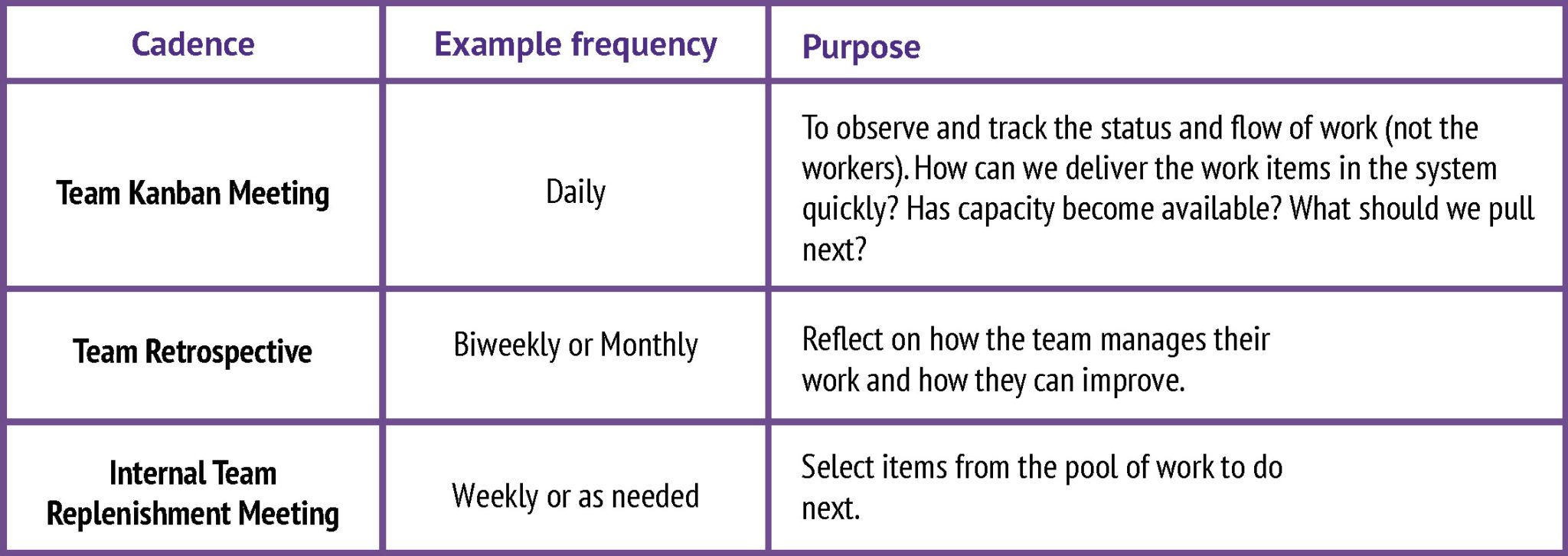
Kanban Cadences

Please note that like all elements of a Kanban implementation, the cadences can and should be set up to it within the given organizational context. In practical terms, this means:

  • Identify existing meetings and reviews that already serve a similar purpose and continually evolve them.
  • Keep the existing names or use the standard cadence naming or come up with something else. It is the purpose that matters.
  • Pick the frequency and duration based on your context. In many cases, having more frequent but shorter meetings over time increases agility.

References

Share:

The eXtreme Programming Method

The Rules of Extreme Programming

References

Share: