Showing posts with label Scaled Agile Framework. Show all posts

The UnFix Model


What unFIX is Not

  • The unFIX model is NOT a framework. There is nothing essential in unFIX. Everything is optional. A better description would be a pattern library.
  • The unFIX model offers NO processes. The purpose of unFIX is to cover only organization design patterns and organizational structure. It is easy to find great advice for processes from many other sources.
  • The unFIX model is NOT for IT only. 
  • The unFIX model is NOT top-down. unFIX suggests a bottom-up approach. You cannot build something large. You must begin with something small.
  • The unFIX model is NOT a replacement. There are plenty of good things in other models and frameworks that should not be thrown away. We just hope that, with unFIX, you will unfix the bad parts and keep all the good bits.

The audience for unFIX is small to medium-sized businesses, not limited to software but it can be scaled up.

The Base (Tribe, Clan, Business Unit)

All Crews operate from a Base of between a handful to a few hundred people.

  • This Base has a number of Crews of the seven standard Crew types organized around one or more value streams.
  • The Base acts like a fully grown, independent business.
  • It contains all the necessary skills to design, develop, and deliver products, from Design Thinking to DevOps and Lean Startup to Lean Manufacturing.

Every person has a Base. It is their home.

  • The Base offers its people a sense of purpose, belonging, and recognition.
  • It provides comfort, personal safety, connectedness, a shared culture, shared toolsets, and career opportunities for all its workers.

Ideally, the Base covers a customer domain, not a technical domain.

  • It is similar to a tribe in the Spotify model and an Agile Release Train (ART) in the Scaled Agile Framework (SAFe). However, cadence and synchronization of work are optional.
  • A critical job of the Base is to continuously reorganize itself depending on the needs of the customer experience.
  • When the architecture needs to change, the organization needs to change.
  • Therefore, the Base does everything it can to support its Crews in remaining flexible.
  • This includes taking care of minimum standards and rules across all Crews so that reteaming is as painless as possible.

Crews (Team, Squad, Pod, Cell)

A Crew is a team that usually consists of three to seven people. 

  • The optimum team size is five. 
  • Team members are mostly dedicated to their Crew, but it’s okay if they reserve a small part of their week for work on a Forum (see below). 
  • In a regular business, most Crews should probably be Value Stream Crews. 
  • Crews can be any of the seven standard types.
  • These self-organizing, cross-functional teams manage their own meetings (planning, check-in, review, and retros); they manage their own documentation and releases, and they may operate according to a team agreement that defines team identity, shared rules, and more. 

There are seven kinds of Crews:

There are several team options:

  • Steady Team (high permanence, low permeability). The team is long-lived, and team membership changes rarely (e.g.: product team).
  • Dynamic Team (high permanence, high permeability). The team itself is long-lived, but team membership changes frequently (e.g. a call center).
  • Mission Team (low permanence, low permeability). The team itself is short-lived, but team membership changes rarely (e.g. rescue team, project teams).
  • Liquid Team (low permanence, high permeability). The team itself is short-lived, and team members also change frequently (e.g. film crew or construction crew).

The best teaming option depends on how the benefits and drawbacks of each pattern play out for your organization

The Forum (Chapter, Guild, Council, or CoP)

All value stream work happens in the Crews, but some things within the Base need to be coordinated along functional lines. A Forum is a group consisting of people from various Crews. 

  • Its primary purpose is for like-minded workers to get together, talk, and make decisions together
  • There could be a DevOps Forum, a UX Forum, a Growth Hackers Forum, etc. 
  • In traditional organizations, the Project Management Office (PMO) could be turned into a Forum.
  • In agile companies, the Product Managers could have their own Forum
  • The Chiefs of the Base might decide which Forums are needed because some Forums play an essential role in the organization's structure.

Chiefs can delegate work to Forums, such as standardization, templates, toolsets, infrastructure, personal development, cross-team coordination, and so on. 

  • They can expect each worker in the Base to be a member of at least one Forum and to participate in the conversations and decisions that matter for their functional areas. 
  • The role of Forums is to be the connective tissue between the Crews.
  • The purpose of a Forum is for people in similar roles to agree on how the work is done within the Base in a self-organized way so that dynamic reteaming is as painless as possible.

Some examples of Forums:

The Turfs (Area, Territory)

The Turfs are areas cultivated and protected by the same people. It could be a codebase, a product area, a machine, a house, or a town district that one group of people collectively takes care of.

  • The Turf is an area of concern with a clearly defined boundary.
  • There is clarity of ownership and responsibilities regarding the Turf.
  • The Turf is not too large; people are able to maintain and cultivate it.
  • The Turf is not too small; it offers enough challenge and motivation.

The Turf has significant relevance because of the maintenance drag. If the Turf that a group of people is responsible for gets too large, they will struggle to maintain it. 

The Captain (Team Lead)

There is a need for one Crew member to act as its Captain.

  • This person is the primary contact for the outside world, and she has final responsibility for whatever happens on the journey. 
  • A Crew can have a few additional roles, such as Product Lead, Tech Lead, etc. Depending on the product and its dependencies on the outside world, different Crew members can manage other communication channels. 
  • In fact, each Crew member could be a "lead" in some area. 
  • The link with the Base (see below) is the Captain.
  • Captains can be appointed, or they can be elected. 
  • However, the Captain never has line management responsibility on a Crew. 
    • The Captain does NOT discuss career development, compensation, or promotions with her crew members. 
    • Either way, she is the manager of the journey, not the Crew members!

The Chiefs (Management Team)

The Chiefs have line management responsibility for everyone in their Base. They are, literally, the management team

  • Depending on how the Chiefs divide the roles, each of them would have between three to twenty direct reports. 
  • Typically, all back-end developers would report to a Chief Technology, and all UX people might report to a Chief Product, and so on. But context should dictate what is reasonable.
  • The Base has a stable management reporting structure, no matter what happens with the Crews. People could hop from Crew to Crew five times per year, and nobody would ever change their manager.
  • Only the Chiefs are responsible for recruitment, compensation, promotions, and so on. 
  • They can delegate the value streams to the Captains of Crews and functional alignment to the Chairs of Forums (see below).

The Chair (Moderator)

The Chair is the manager of the Forum and NOT the manager of the people.

  • The person who moderates a Forum has responsibility for the workings of the Forum. 
  • He is not the manager of the people who participate in the Forum. 
  • It is a part-time job, typically taken up by someone with some seniority in the Base. 

The unFIX model is not a matrix organization. 

  • Different Crew members participate in different Forums, and they may have different Chiefs as managers. 
  • The Chiefs always work on the same Governance Crew. The managers have the same objectives. 
  • When there’s a conflict on a Crew, it can escalate to only one management team! Goodbye matrix.

Scaling Up

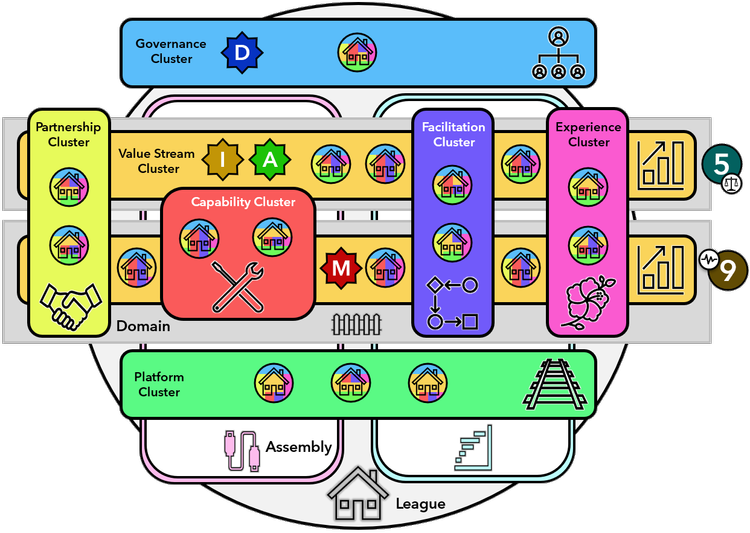
Dozens of Bases can collaborate in a League.

  • Within a League, they might form Clusters (similar to people forming Crews). 
  • Some Bases could self-organize into a Value Stream Cluster, others into a Facilitation Cluster, a Platform Cluster, a Capability Cluster, etc. 
  • The League has its own management team (Governance Cluster) and is organized around co-dependent value streams or related customer experiences.

Similarly, cross-Base coordination can be handled in Assemblies (similar to people coordinating their work in Forums). 

  • These Assemblies are voluntary structures that enable the representatives from Bases to coordinate ways of working across the borders of a single Base.

We can even go another level up and say that dozens of Leagues might form a Crowd

  • The Leagues could self-organize and collaborate in Coalitions and coordinate their work in Congresses. 
  • Again, all earlier patterns repeat at the higher levels which makes the unFIX model self-similar across all scales. It is a fractal model.
Others

References

Share:

The Prime/OS Method

Prime/OS defines a repeatable technique for introducing change into your organization. It is based on the power of invitation and the ability of teams, departments and organizations to achieve high performance quickly when they are engaged in helping to create the process.

Prime/OS is a methodology. It can be used to introduce any kind of procedural or cultural change. It works with what you are currently doing, and can be added at any time. A hypothesis of Prime/OS is that increases in engagement drive increases in productivity, after a brief delay. The purpose of Prime/OS is to increase levels of engagement on the part of everyone involved.

The core concept of Prime/OS is the rite of passage or "passage rite". A passage rite is a cultural event (and a kind of social game) that helps people who have membership make sense of complex social transitions. Agile adoptions are complex social transitions.

Prime/OS Core Elements

  • Prime/OS Phase 1: Introduction. Experiencing engagement via opt-in participation and OpenSpace.
    • Opening Consulting with the Leadership by Consultant.
    • Game Mechanics: Goal, Rules, Scoring, Opt-in.
    • Invitation as Primary Opt-in mechanism.
    • OST-1 (initial OpenSpace meeting):
      • Minimum of 1 day of OpenSpace (2 is preferred).
      • Minimum of 90 days of experiments playing with practice, between the scheduled OpenSpace events.
      • Output is learning and some deliveries.
      • Leadership signaling with Storytelling (and other highly symbolic behaviors).
    • OST-2 (second OpenSpace meeting, which terminates "Chapter 1" of the process change and opens "Chapter 2" of the organizational "story" of the change.)
    • Follow-up. Closing consulting with Leadership.
      • Processing the proceedings.
      • Leadership signaling with storytelling (and other highly symbolic behaviors.)
      • The Coaching consultant delivers on what to possibly consider next.
      • The coaching consultant vacates the org and does not communicate with it for at least 1 month, to trigger self-sustaining self-organization behaviors on the part of the org.
  • Prime/OS Phase 2: Competence. Recurring OST events.
    • Minimum 1 year.
    • Evidence must be present first that the org has processed and completed Phase 1.
      • Several "Chapters" of learning, bound by 2 OpenSpace.
    • Repeat Prime/OS's OpenSpace events approximately every 6 months, typically in January and June until the org reaches Phase 3.
  • Prime/OS Phase 3:  Mastery. No more scheduled events, due to a maturing of the org.
    • Instead of scheduling OpenSpace events in a fixed schedule, the org senses and response t the need for periodic, "as-needed" OpenSpace events.
    • Evidence must be present first, that the org has reached Phase 2.
      • The scheduled OpenSpace events become less interesting.
      • The org can consistently demonstrate "safe space".
        • The org has made substantial changes to the HR policies with the intent to support Prime/OS Phase 3 culture.
        • The org is hiring and firing based on cultural fit.
      • The org has established norms for dealing with the ongoing conflict which is a natural consequence of independent thinkers working together in a volatile, high-change business environment. 

References

Share:

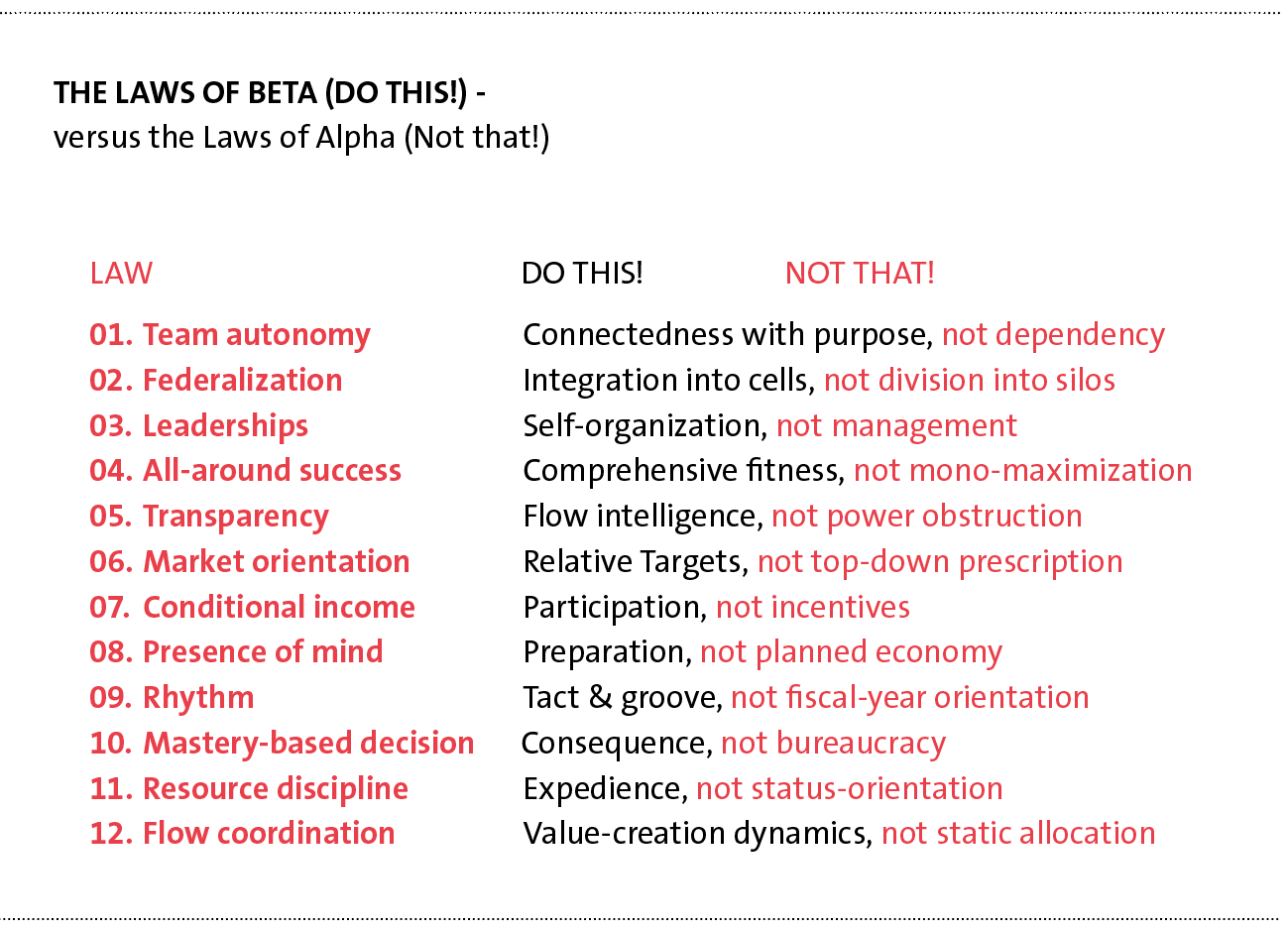
The OpenSpace Beta Method

What is OpenSpace Beta?

OpenSpace Beta is the way for your organization to become high-performing. Not within years, but within a few months. Regardless of size. It's an open-source social technology that allows your company to get from siloed and dull to decentralized and adaptive. Within 90 days.


References

Share:

The OpenSpace Agility Method

What is OpenSpace Agility (OSA)?

OpenSpace Agility (OSA) is a repeatable technique for getting rapid and lasting Agile adoption. It works with what you are currently doing, and can be added at any time.

In OSA, executive leaders are very much in charge of the process. When using OSA, leaders clearly communicate two key aspects:

  • An overall Agile direction.
  • A very clear set of guardrails or limits or rules for everyone involved: the developers, teams, and stakeholders.

By focusing on employee engagement, as a leader you can expect the following outcomes:

  • A dramatic reduction in the coaching & training costs of your Agile program
  • A rapid, genuine, and lasting Agile transformation
  • Much higher employee engagement scores
  • Predictable, reliable, repeatable improvement in overall results
  • Increases in stakeholder satisfaction and potentially, stakeholder delight
Each OpenSpace Agility cycle has just 5 basic and repeatable steps

  • These steps are repeated in an iterative fashion. 
  • OpenSpace Agility actually embodies the Agile principles of iteration, experimentation, frequent inspection, and improvement. OSA implements Agile in a very Agile way.
  • Any Agile framework is acceptable for use with OSA
  • You can think of OSA as a process for introducing that framework.

Step 1: Leadership and Enterprise Preparation

  • Leaders Define Clear Direction.
    • Leaders explain "the why" of the Agile direction, by citing the business opportunities, the business challenges, and the need for continuous improvement.
  • Leaders Define Clear Guardrails and Rules.
    • Define and describe some very clear boundaries and guardrails. 
    • These guardrails are the 12 principles of the Agile Manifesto. 
    • Practices that align with these 12 principles are acceptable for teams to use.
  • Collection of Starting Key Performance Indicators (KPIs)
    • OpenSpace Agility uses evidence-based metrics. 
    • Before working in an Agile way, a baseline set of measures is taken. 
    • These measures serve as both a diagnostic, to surface issues, and as a metric, for a subsequent before-and-after compare.
  • Training In Agile Fundamentals
    • Teaching in Agile principles and practices is offered to everyone. 
    • All stakeholders and team members are encouraged to attend.
  • No Mandate of Specific Practices
    • Leaders offer opportunities for teams to choose from a range of Agile practice options within a well-defined container.
    • Several very specific measuring instruments are utilized during this preparation step.

Step 2: Initiate the process using an all-hands "OpenSpace" meeting

  • The first OpenSpace meeting: 
    • This is a facilitated all-hands meeting of at least one day that is authorized by executive leadership. 
    • The executives lead the way. This is the formal kick-off of your Agile journey. It sets the stage for the org-wide learning, engagement, and improved results that follow.

Step 3: Initiate Agile practices across the enterprise

  • Teams are authorized to use practices that align with the Agile Manifesto. 
  • The outputs from this step include:
    • More predictable and reliable software deliveries
    • Enormous levels of Agile learning… up, down, and across the organization.
    • Dramatically higher levels of employee engagement
    • The collection-specific metrics to measure results, and inform the next steps

Step 4: Complete the process in OpenSpace

  • The Second OpenSpace meeting.
    • It is both a retrospective and a prospective one. 
    • The organization looks back, and forward (making actionable plans).
    • As a result of this process, you can expect:
      • Your process to tangibly mature and improve. 
      • You can expect your entire organization to engage in the difficult business of customizing and tailoring the Agile process to your context, in service to continuous improvement.

Step 5: Inspect Results and Adapt

  • When this step is reached, the multi-team iteration (or "chapter of learning") is complete. 
  • The results are inspected. Executives encourage engagement in the process of continuous improvement. 
  • Adjustments are made and the next cycle of 45 to 100 days is planned.

References

Share:

The Enterprise Scrum Framework

What is Enterprise Scrum?

Enterprise Scrum is an adaptation and extension of Scrum based on abstraction, generalization, and parameterization; that can be used in a scaled generic way for any management purpose.

The goal of the Enterprise Scrum is to grow unicorns and transform dinosaurs into unicorns. In other words, Enterprise Scrum powers DISRUPTION and allows companies of all sizes to be managed like startups which can simultaneously act like VCs as they grow up. 

Many of the Roles and Artifacts in Enterprise Scrum are named differently to not confuse other business people with the word "product".

Roles

  • Business Owner. Used instead of the Product Owner (PO) role.
  • Coach. Used instead of the Scrum Master (SM) role.
  • Team. It is still the Team.

Business Value

  • It is defined explicitly through a balance of the metrics (see below).

Artifacts

  • Value List. Used instead of "Product Backlog".
    • A list of things that when DONE add value. 
  • Value List Items (VLIs). Instead of Product Backlog Items (PBIs).
    • Each of them with a DOR, DOD, and other attributes. 
    • VLIs are DONE according to their DOD every Cycle. 
  • Projections
    • These are made with measurements over metrics of what got DONE (see below), so Release Planning is naturally included for all Cycles and at all levels.

Events

  • Cycle. Used instead of Sprints.
    • Cycles can be recursive without limit. 
    • You can have a yearly cycle, a quarterly cycle, or a 2-week cycle.

Techniques

  • Techniques of different types and at different levels can be included with specific parameters and inserted as 1) new steps, 2) to get work done into the framework relevant to the purpose of the instance (see below).
  • For example, techniques can be added for 1) facilitating work like User Stories, or 2) insertable NEW steps in an instance like Release Planning, or Architectural Scan added as NEW activities in the Initial Value List/Wave Projection.

Metrics and Reports

  • The only mandated report is the ScrumBoard.
  • In contrast with Scrum with 1 metric, the velocity, in Enterprise Scrum we are FREE to have as many metrics as you want/need. For example, we could track, profit, revenue, incidents, effort, customer satisfaction, compliance levels, etc.
  • In contrast with Scrum where we have the Burn down charts, in Enterprise Scrum you are FREE to choose any type of report.

Other Parameters

  • Enterprise Scrum also provides 80+ other parameters to extend, customize and apply the Scrum concepts to different domains, scaling, or adding techniques. 
  • These parameters were abstracted primarily by observing what people had already done in the field as they used Scrum for different purposes. 
  • These parameters make Enterprise Scrum a true framework, as the customizable parts are now visible and explicit. (I will release the full list of parameters later as a different publication.)

Instances

  • The framework exists as an explicitly customizable tool, but once the parameters, techniques, and added steps have been chosen, a defined Enterprise Scrum instance is created explicitly. For example, there are instances like:
    • the instance of Enterprise Scrum with User Stories and Release Planning.
    • the instance of Enterprise Scrum for Marketing.
    • the instance of Enterprise Scrum for Compliance Management.
    • the instance of Enterprise Scrum for Real State Sales.
    • the instance of Enterprise Scrum for Business Unit Portfolio management.

The Wave Principle

  • Any long-term "rough" predictions made in the Initial Value List of a longer Cycle, must be refined or recalculated after each and every shorter Cycle it includes.

References

Share:

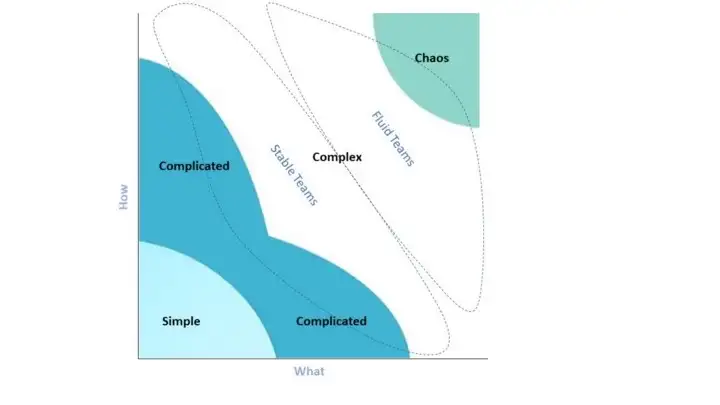
The Fluid Teams

What are Fluid Scrum Teams?

Fluid Scrum Teams organize themselves based on the work at hand. It is a vital aspect of approaches like Open Space Technology and FAST Agile. 

  • Every time new topics need to be addressed, the people of the Fluid Scrum Teams organize themselves to optimize the chances of success of the challenges. 
  • They form smaller teams each Sprint to maximize their effectiveness.

Suppose your pool of people is 20, these people organize themselves into 2 to 7 teams to address specific topics.

Fluid Scrum Teams and Scrum events

  • Sprint Planning:
    • All the Developers that work on the product, the entire pool of people, are present. 
    • The Product Owner proposes a number of objectives for the upcoming Sprint. 
  • Sprint Objectives:
    • A discussion to agree upon the objectives.
    • People of the Fluid Scrum Team self-organize themselves around the objectives.
    • They decide how to split into multiple teams working on their own objectives during one Sprint.
  • Daily Scrum:
    • The teams have their own Daily Scrums.
  • Sprint Review.
    • There's one Sprint Review reflecting upon the outcome of the work of all the teams. 
    • In every Sprint, different teams will be formed to address the objectives.
  • Fluid Scrum Teams are cross-functional.
  • Fluid Scrum Teams and self-management

Team Types

  • Complete fluidity.
    • In every Sprint, the teams that are formed can be totally different, depending on the problems at hand. 
    • This is a solution for environments that are especially complex and every new problem is distinctly different from previous problems.
  • Partial fluidity.
    • A part of the pool of people is working in stable steams addressing topics of a certain nature for multiple Sprints. 
    • Another part is fluid and organizes again and again. 
    • This approach is helpful for environments with elements of high complexity and also elements of lower complexity.
  • Specific fluidity.
    • A smaller group of people with special skills are assigning themselves to teams based on the need for their skills. 
    • Many organizations work like this. Especially when they have people that can’t work with a single team full-time. 
    • Think architects, database administrators, network specialists, and salespeople.
  • Fully stable teams.
    • The teams will not change for a longer period. 
    • In every Sprint, the teams have the same composition. 
    • This can be a good approach for environments that are complex, but with a high degree of predictability of the type of work at hand.

In complex environments, Fluid Scrum Teams can increase agility. By relaxing the constraint on stable teams, your teams will be able to handle increased complexity and tame the chaos.

References

Share:

The FAST Framework

FAST is the acronym for Fluid Scaling Technology. Fluid Scaling Technology combines OpenSpace Technology1 and Open Allocation to create a  lightweight, simple-to-understand, and simple-to-master method for organizing people around work - that scales.

Where and When to use FAST

  • FAST is ideally suited for business environments or challenges that show complexity, rapid change, or where there is a need for innovation. 
  • FAST is ideal for software development, product development, and agile at scale - because of their typically complex nature. 
  • FAST is applicable to most complex collaborative endeavors and is not limited to just the software domain.
  • FAST is built on fluid (re)teaming rather than static teams to maximize adaptability.
  • FAST is the same process at the small through to the large scale.
  • FAST is not built on Scrum. Instead, FAST is built on OpenSpace Technology.
  • FAST operates as a pure complex system
    • FAST also accommodates complicated and simple work.

FAST Roles

  • Product Manager
    • This role is not one of authority and command but more inspiration. 
    • Motivation, encouragement, communicating a clear vision, recommunicating the vision often, direction setting, standard-setting, providing feedback, and modern product management.
  • Team Members
    • A T-shaped team player committed to delivery, collaboration, communication, listening, continuous learning, and personal mastery.
    • Generalizing specialists.
  • Team Steward:
    • Natural leadership role where a Team Member has chosen to steward some work in a Value Cycle
    • Just as teams are fluid in FAST, team stewardship is fluid and not static.
  • Feature Steward (Optional):
    • As teams are not static in FAST, it can make sense for at least one person to stay with a feature/opportunity/outcome to see it all the way through to completion. 
    • Provide continuity across Value Cycles and serve as a point of contact for stakeholders. 
    • It is not required to work continuously on the feature they are stewarding, only to have a continuous understanding of the work.

FAST Artifacts

  • Product Map – The Big Picture.
    • It's an extension of Jeff Patton's Story Mapping (Patton). The difference is that a Product Map focuses on high-level elements only, e.g. bets, capabilities, opportunities, aspects, desired outcomes, business goals, initiatives, themes, and features.
    • It's s a way to visualize what the Collective is doing as a whole. The map shows progress at a high level by the ratio of started, not started, and done.
    • Finer-grained details of high-level items are represented in Discovery Trees.
  • Discovery Trees – Thinking Big While Working Small.
    • Whenever work starts on a high-level item, create a Discovery Tree. A Discovery Tree represents the complexity of work while giving context to work items.
    • Break down work to understand, discover, or plan. But only just enough and just in time. 
    • As work recursively gets broken down from a high-level item into smaller subcomponents, a structure of branch and leaf nodes reveals itself.
    • The current progress toward node completion is evident by the ratio of nodes started, not started, or completed (or removing completed nodes from the tree).
  • Marketplace Board.
    • It visually represents a marketplace of work for a Value Cycle. 
    • The board shows what is happening in the current Value Cycle and who is on which team. (The FAST Marketplace Board borrows from OpenSpace's Bulletin Board.)
    • Each column on the Marketplace Board might represent a physical collaboration area. 
    • To constrain work in progress (WIP), limit the number of places available in the Marketplace.
    • On the board, this might mean restricting or removing columns.
  • Collective Agreements – How We Self-manage
    • It's a living document that describes the rules and mechanics of self-management within the Collective. Collective Agreements create and protect harmony and psychological safety. At a minimum, it should include: 
      • How do we make decisions?
      • How do we resolve conflict?
      • How do we change the Collective's Agreements?
      • Where do we keep the Agreements?

FAST Meeting

The FAST Meeting is the only event in FAST and it is facilitated by the FAST Product Manager. The current Value Cycle is declared closed, and the next starts.

  • Phase 1: Closing the Current Value Cycle.
    • Collective Synchronisation via Show and Tell. A representative from each team briefly summarises their team's work in the last Value Cycle, highlighting value delivered and discoveries made. It includes concise demonstrations if helpful.
    • Once all teams have completed their show and tell, the Value Cycle is closed.
    • Clear the Marketplace Board in readiness to repopulate again in the next Value Cycle.
  • Phase 2: Starting the Next Value Cycle
    • Reiterate Vision and Set Direction
    • Each FAST Meeting is an opportunity for the Product Manager to align, rally, and reinspire the Collective by reiterating the product vision, mission(s), and purpose. In addition, the Product Manager may choose to set priorities or direction for the Value Cycle. 
    • The Product Map can be a useful visual aid for this, and why having it on permanent display in the forum is recommended. 
  • Phase 3: Emerging Work & Self-selecting into Teams.
    • Create and Open the Marketplace.
    • Any Member can stand up in front of the Collective and declare their intent to steward a goal. The goal may be related to priorities just announced. Or not.
    • Once volunteers have stopped coming forward to steward work or the WIP limit has been reached, the Marketplace is declared open.
    • Collective Members then self-select into whichever team they feel they can contribute the most value to, or learn and grow the most from. 
    • Members go to the Marketplace Board and put their names into the slot associated with the goal they are interested in working on for that cycle.
    • Teams might be a component, feature, discovery team, or other, dependent on the work.
    • Teams have the autonomy to do whatever they feel is the best and right thing needed to add value.
  • Announcements (Optional)
    • The Collective being gathered is an opportunity to make announcements. Announcements may be unrelated to work in the Value Cycle but are still relevant to the Collective.
  • Starting Work - Resolve Dependencies, Architect, Design, Plan, and Collaborate.
    • The dynamically formed teams now go to their chosen development area and plan. Each team tasks out their work and agrees on how they will collaborate. Should a team identify that they are likely to clash with another team or have dependencies, they meet with the other team(s) and discuss. To resolve dependencies or clashes, they might:
      • Merge.
      • Pick up some other work.
      • Have a design discussion, then plan if and how to divide labor.
      • Resolving dependencies this way can happen at any point in the cycle.

FAST Cadence and Flow

  • Synchronize the Collective to a shared understanding (via show and tell).
  • The pause between cycles is a sensing point to adjust teams, or work items should a better fit make sense. What was discovered in the last cycle? Has our understanding of the work or customer changed? Did any metrics change? Etc.
  • Revisit the purpose and vision of the product and company. Repetition, repetition... 
  • Cycles are not time boxes. Sign-off can happen at any point. Therefore, continuous delivery/deployment is a compatible natural fit and highly recommended for FAST.

FAST Adoption

FAST is a method that works on a small scale, large scale, and everything in between. It is the same process throughout, with only a few minor differences. A Collective is typically responsible for only one product or value stream in its entirety, but multiple products for a Collective are feasible. In the case of multiple products, the Product Manager can be singular or plural.
  • Small-scale FAST – Fewer Than 14 People. 
    • Use small-scale FAST when a Team has (roughly) fewer than fourteen people. 
    • Small-scale FAST can replace/supersede Scrum.
    • The collaboration units that Collective breaks into are smaller than in large-scale FAST. 
    • The smallest collaboration unit in small-scale FAST is two people, and pair programming is recommended when two. 
    • Mob Programming (Pearl) works well for collaboration units larger than two people.
  • Large-scale FAST – 14 to 200 People. 
    • Large-scale FAST is for a Collective of around fourteen or more people.
    • Collaboration units are typical agile software team sizes, e.g. 3-13 people.
    • Once a Collective grows too far past Dunbar's number (150), split and spin off a new Collective.
  • FAST Portfolio describes multiple Collectives. 
    • Working in this mode, FAST Product Managers meet for portfolio discussions.

FAST in Enterprise

  • FAST can integrate with other enterprise methods such as BOSSA nova, FLEX, and SAFe.

FAST Continuous Improvement.

  • FAST is not prescriptive on methods for implementing the principle of reflect and tune.
  • Each Collective should experiment and discover what works best. Some ideas and options:
    • Form a FAST Guild that meets on cadence to reflect and tune.
    • Host regular OpenSpace Events for the Collective with the theme Reflect and Tune.
    • Add a Turn Up the Good section to the FAST Meeting.

References

Share:

The Scrum@Scale Framework

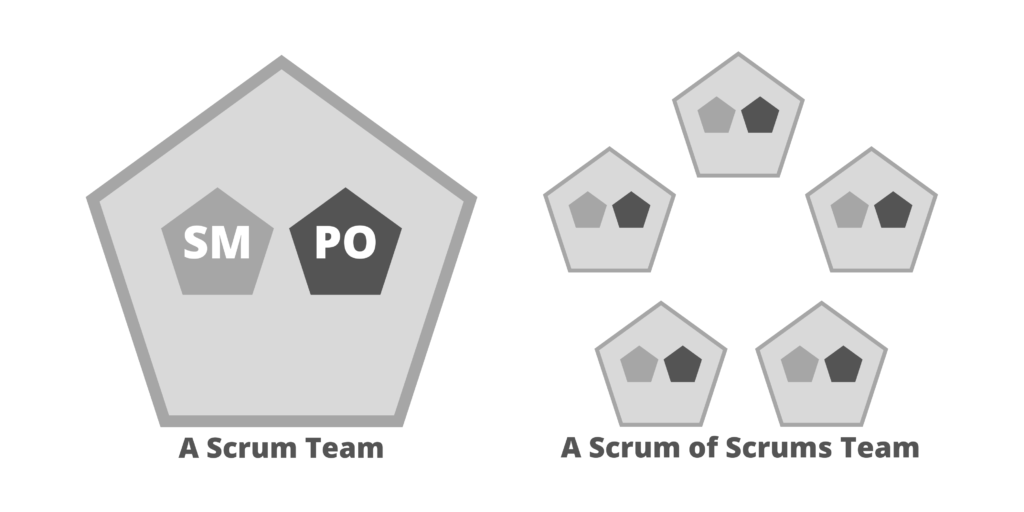
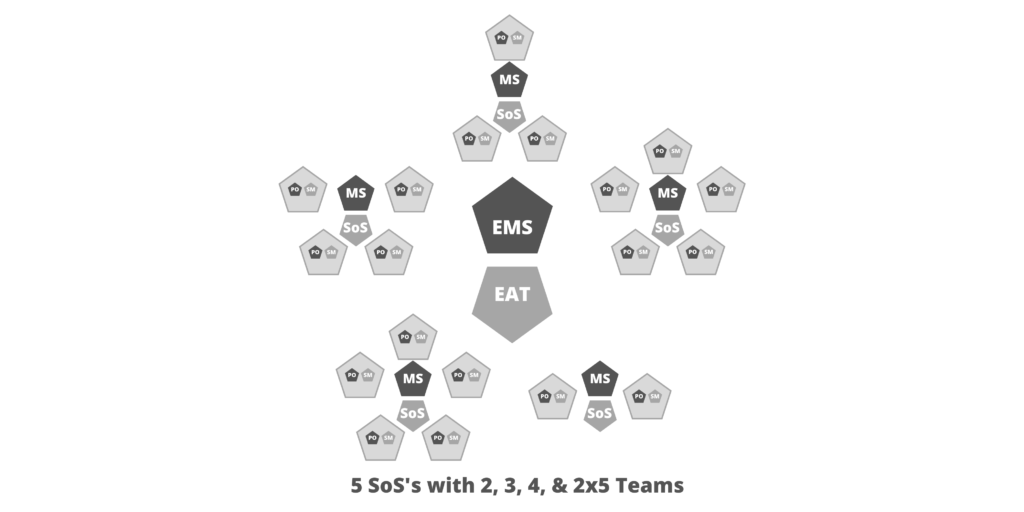
Scrum of Scrums (SoS)

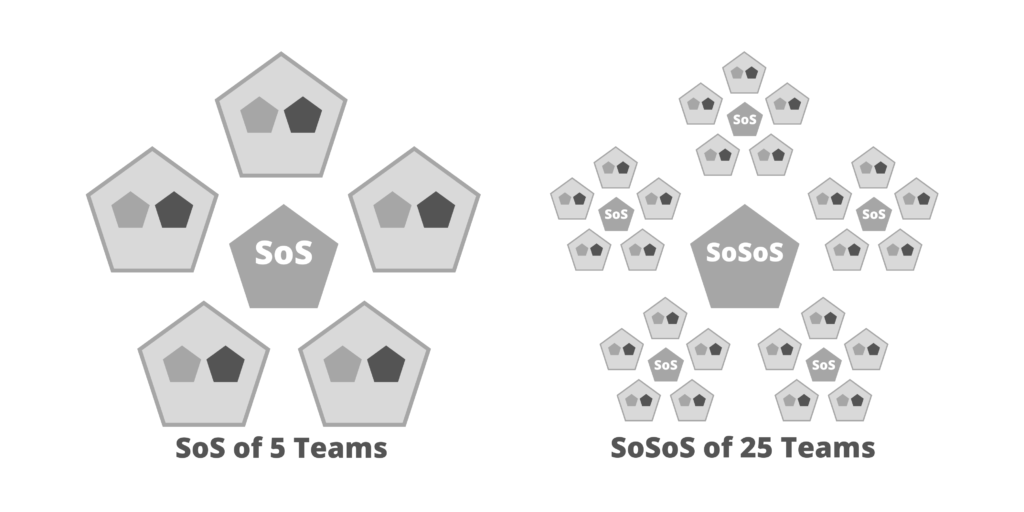
A Scrum of Scrums operates as if it were a Scrum Team, satisfying the Team Process component with scaled versions of the Scrum accountabilities, events, and artifacts. While the Scrum Guide defines the optimal team size as being fewer than 10 people, Harvard research has determined that the optimal team size is 4.6 people (on average). Therefore, the optimal number of teams in a Scrum of Scrums is 4 or 5.

As a dynamic group, the teams composing the Scrum of Scrums are responsible for a fully integrated set of potentially shippable increments of product at the end of every Sprint. Optimally, they carry out all of the functions required to release value directly to customers.

Scrum of Scrums of Scrums (SoSoS)

Depending upon the size of the implementation, more than one Scrum of Scrums may be needed to deliver a complex product. In such cases, a Scrum of Scrum of Scrums (SoSoS) can be created out of multiple Scrums of Scrums. Each of these will have scaled versions of each Scrum of Scrums’ roles, artifacts, and events.

Scaled Events

  • Scaled Daily Scrum (SDS)
    • The main talking points of a Daily Scrum are the progress towards the Sprint Goal and impediments to meeting that commitment. 
    • In a scaled setting, the Scrum of Scrums needs to understand collective progress and be responsive to impediments raised by participating teams; therefore, at least one representative from each team attends a Scaled Daily Scrum (SDS)
    • Any person or number of people from participating teams may attend as needed.
    • To optimize collaboration and performance, the Scaled Daily Scrum event mirrors the Daily Scrum, in that it:
      • Is time-boxed to 15 minutes or less.
      • Must be attended by a representative of each team.
      • Is a forum to discuss how teams can work together more effectively, what has been done, what will be done, what is going wrong & why, and what the group is going to do about it
      • Some examples of questions to be answered:
        • What impediments does a team have that will prevent them from accomplishing their Sprint Goal or that will impact the delivery plan?
        • Is a team doing anything that will prevent another team from accomplishing their Sprint Goal or that will impact their delivery plan?
        • Have any new dependencies between the teams or a way to resolve an existing dependency been discovered?
  • Scaled Retrospective
    • Every Sprint, the Scrum of Scrums holds a scaled version of the Sprint Retrospective where the Scrum Masters of each team get together and discuss what experiments have been done to drive continuous improvement and their results. 
    • Additionally, they should discuss the next round of experiments and how successful improvements can be leveraged across the group of teams or beyond.

Scaled Accountabilities

  • Scrum of Scrums Master (SoSM)
    • The Scrum of Scrums Master is accountable for ensuring the Scaled events take place, are productive, positive, and kept within the time box. 
    • The Scrum of Scrums Master may be one of the team's Scrum Masters or a person specifically dedicated to this role. 
    • They are accountable for the release of the joint teams' efforts and continuously improving the effectiveness of the Scrum of Scrums. This includes greater team throughput, lower cost, and higher quality. In order to achieve these goals, they must:
      • Work closely with the Chief Product Owner to deliver a potentially releasable product increment at least every Sprint.
      • Coordinate the teams’ delivery with the Product Owners' Team's release plans
      • Make impediments, process improvements, and progress visible to the organization
      • Facilitate the prioritization and removal of impediments, paying particular attention to cross-team dependencies
  • Executive Action Team (EAT)
    • It fulfills the Scrum Master accountabilities for an entire agile organization. This leadership team creates an agile ecosystem that allows the Reference Model to function optimally, by:
      • Implementing the Scrum values
      • Assuring that Scrum roles are created and supported
      • Scrum events are held and attended
      • Scrum Artifacts and their associated commitments are generated, made transparent, and updated throughout each Sprint.
      • Formulating guidelines and procedures that act as a translation layer between the Reference model and any part of the organization that is not agile.
    • The Executive Action Team is accountable for removing impediments that cannot be removed by members of the Scrum of Scrums (or wider network).


Notes

  • Scrum@Scale is also known as Scrum of Scrums.

References

Share:

The LeSS Framework

Agile development with Scrum requires a deep organizational change to become agile. Therefore, neither Scrum nor LeSS should be considered merely a practice. Rather, they form an organizational design framework.

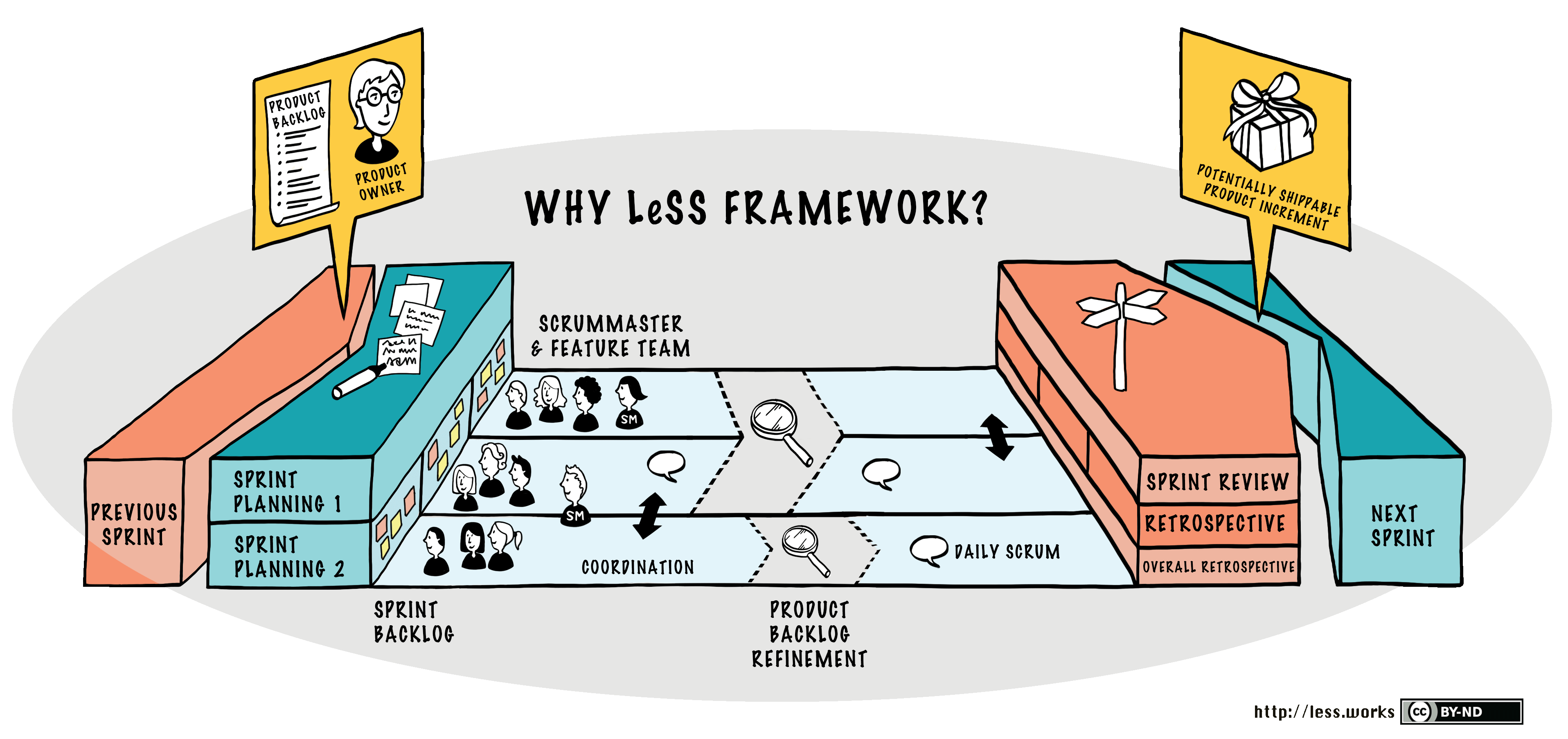
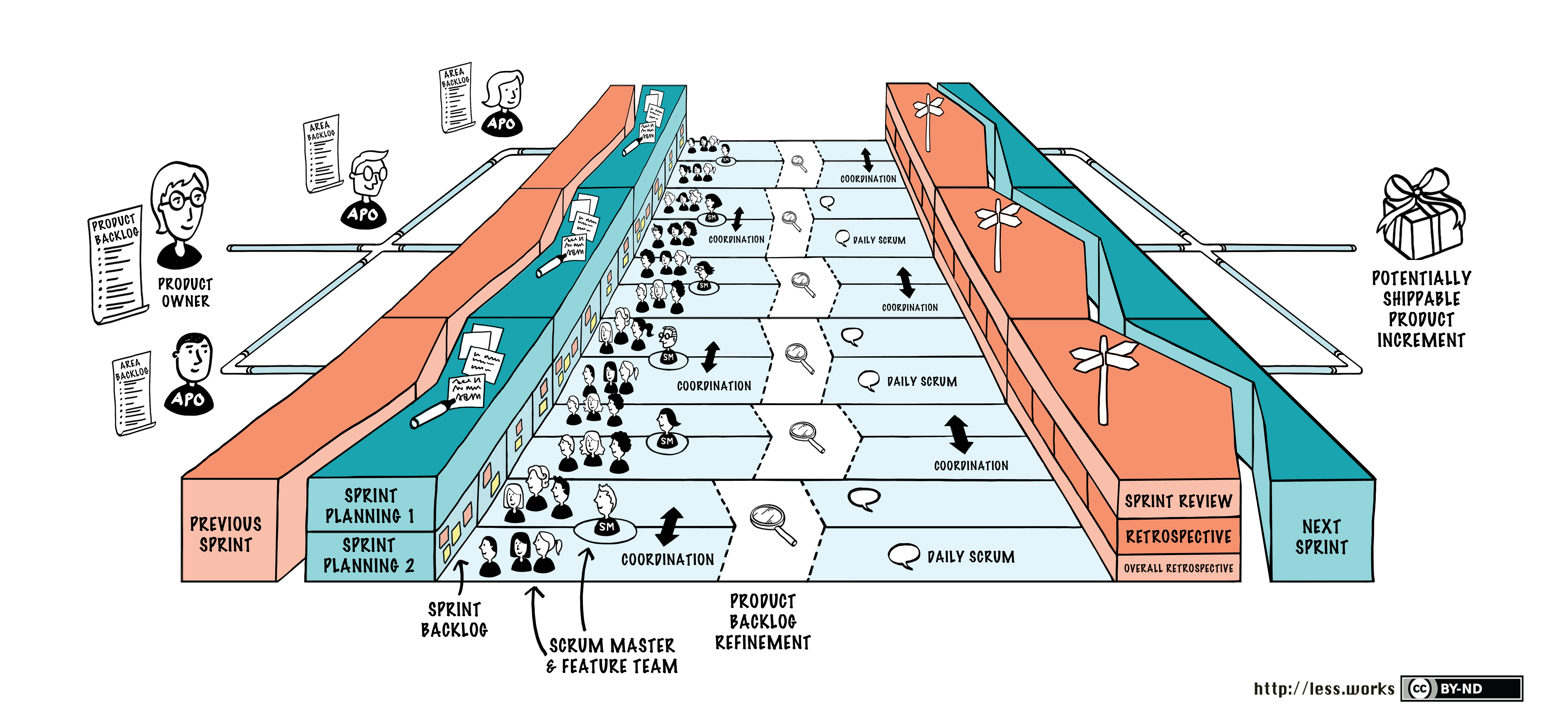
LeSS provides two different large-scale Scrum frameworks. Most of the scaling elements of LeSS are focused on directing the attention of all of the teams to the whole product instead of "my part." Global and "end-to-end" focus are perhaps the dominant problems to solve in scaling. The two frameworks – which are basically single-team Scrum scaled up – are:

  • LeSS: Up to eight teams (of eight people each).
  • LeSS Huge: Up to a few thousand people on one product.

Same as Scrum

LeSS is a scaled-up version of one-team Scrum, and it maintains many of the practices and ideas of one-team Scrum. In LeSS, you will find:
  • A Single Product Backlog (because it’s for a product, not a team),
  • One Definition of Done for all teams.
  • One Potentially Shippable Product Increment at the end of each Sprint.
  • One Product Owner.
  • Many complete, cross-functional teams (with no single-specialist teams),
  • One Sprint.

Different than Scrum

  • Sprint Planning Part 1: In addition to the one Product Owner, it includes people from all teams. Let team members self-manage to decide their division of Product Backlog Items. Team members also discuss opportunities to find shared work and cooperate, especially for related items.
  • Sprint Planning Part 2: This is held independently (and usually in parallel) by each Team, though sometimes for simple coordination and learning two or more Teams may hold it in the same room (in different areas).
  • Daily Scrum: This is also held independently by each Team, though a member of Team A may observe Team B’s Daily Scrum, to increase information sharing.
  • Coordination: Just Talk, Communicate in Code, Travelers, Open Space, and Communities.
  • Overall PBR: There may be an optional and short overall Product Backlog Refinement (PBR) meeting that includes the Product Owner and people from all teams. The key purpose is to decide which teams are likely to implement which items and therefore select those items for later in-depth single-team PBR. It is also a chance to increase alignment with the Product Owner and all teams.
  • Product Backlog Refinement: The only requirement in LeSS is single-team PBR, the same as in one-team Scrum. But a common and useful variation is multi-team PBR, where two or more Teams are in the same room together, to increase learning and coordination.
  • Sprint Review: In addition to the one Product Owner, it includes people from all teams, and relevant customers/users, and other stakeholders. For the phase of inspecting the product increment and new items, consider a “bazaar” or “science fair” style: a large room with multiple areas, each staffed by team members, where the items developed by teams are shown and discussed.
  • Overall Retrospective: This is a new meeting not found in one-team Scrum, and its purpose is to explore improving the overall system, rather than focusing on one Team. The maximum duration is 45 minutes per week of Sprint. It includes the Product Owner, Scrum Masters, and rotating representatives from each Team.

Less Huge

References

Share:

The Nexus Framework

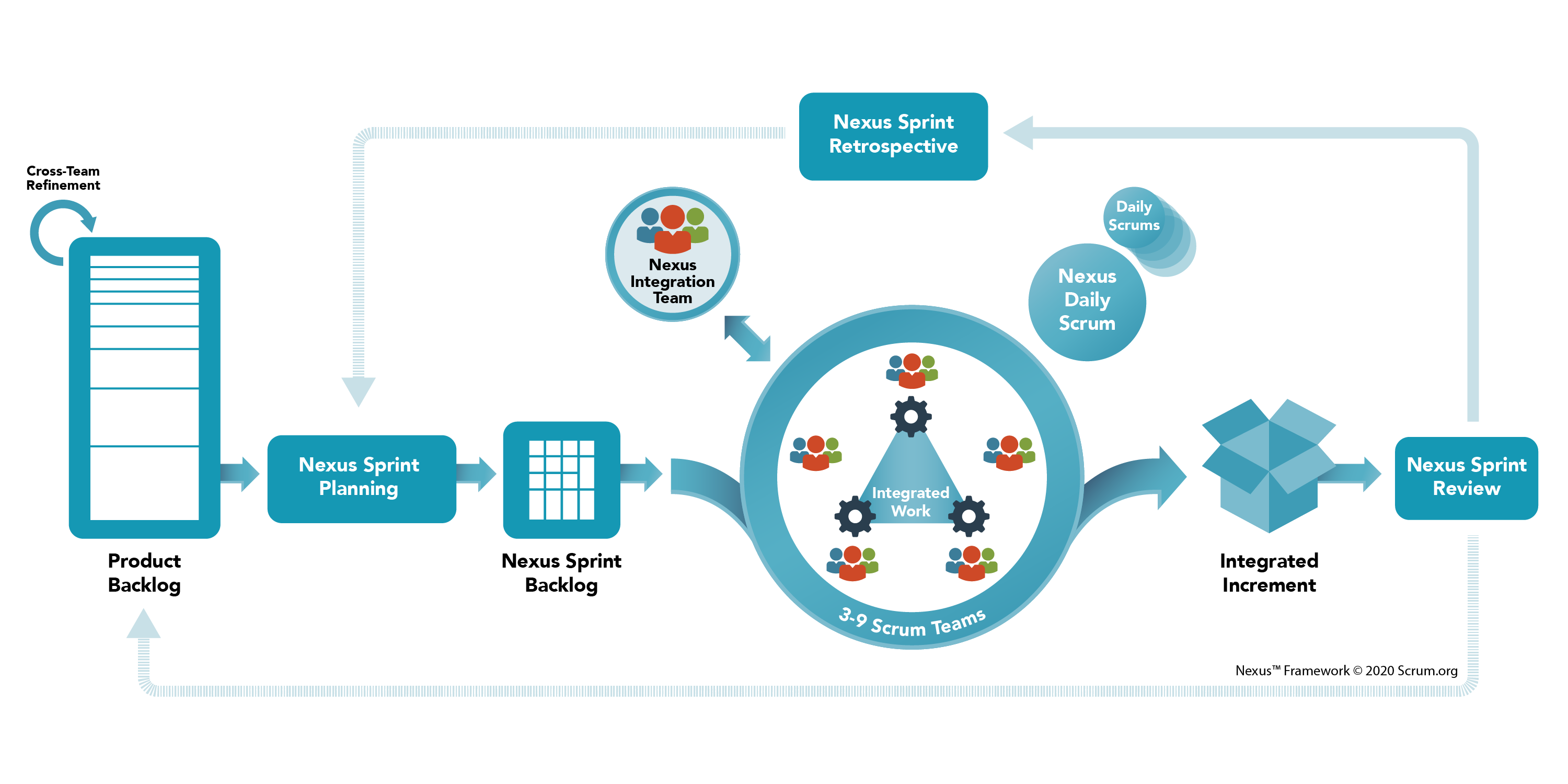
A Nexus is a group of approximately three to nine Scrum Teams that work together to deliver a single product; it is a connection between people and things. A Nexus has a Single Product Owner who manages a single Product Backlog from which the Scrum Teams work.

The Nexus framework defines the accountabilities, events, and artifacts that bind and weave together the work of the Scrum Teams in a Nexus. It minimally extends the Scrum framework only where absolutely necessary to enable multiple teams to work from a Single Product Backlog to build an Integrated Increment that meets a goal.

The Nexus Framework helps teams solve common scaling challenges like reducing cross-team dependencies, preserving team self-management and transparency, and ensuring accountability. 

  • Nexus helps to make transparent dependencies. 
  • Nexus provides opportunities to change the process, product structure, and communication structure to reduce or remove these dependencies.

Nexus Accountabilities

  • Nexus Integration Team. The Team is accountable for ensuring that a done Integrated Increment (the combined work completed by a Nexus) is produced at least once a Sprint. 
    • It provides the focus that makes possible the accountability of multiple Scrum Teams to come together to create valuable, useful Increments, as prescribed in Scrum.
    • Integration includes addressing technical and non-technical cross-functional team constraints that may impede a Nexus’ ability to deliver a constantly Integrated Increment.
    • It should use bottom-up intelligence from within the Nexus to achieve resolution.
  • The Product Owner
    • A Product Backlog has a single Product Owner who has the final say on its contents. 
    • The Product Owner is accountable for maximizing the value of the product and the work performed and integrated by the Scrum Teams in a Nexus. 
    • Is accountable for effective Product Backlog management.
  • A Scrum Master
    • The Scrum Master in the Nexus Integration Team is accountable for ensuring the Nexus framework is understood and enacted as described in the Nexus Guide. 
    • This Scrum Master may also be a Scrum Master in one or more of the Scrum Teams in the Nexus.        
  • One or more Nexus Integration Team Members
    • Scrum Team members who help the Scrum Teams to adopt tools and practices that contribute to the Scrum Teams’ ability to deliver a valuable and useful Integrated Increment that frequently meets the Definition of Done.

Nexus Events 

Nexus adds to or extends the events defined by Scrum. 

  • The duration of Nexus events is guided by the length of the corresponding events in the Scrum Guide. They are timeboxed in addition to their corresponding Scrum events.
  • It may not be practical for all members of Nexus to participate to share information or come to an agreement. Except where noted, Nexus events are attended by whichever members of the Nexus are needed to achieve the intended outcome of the event most effectively.
  • The Sprint. A Sprint in Nexus is the same as in Scrum.
  • Cross-Team Refinement. Reduces or eliminates cross-team dependencies within a Nexus. 
    • The Product Backlog must be decomposed so that dependencies are transparent, identified across teams, and removed or minimized. 
    • Product Backlog items pass through different levels of decomposition from very large and vague requests to actionable work that a single Scrum Team could deliver inside a Sprint.
    • The frequency, duration, and attendance of Cross-Team Refinement vary.
    • Where needed, each Scrum Team will continue its own refinement in order for the Product Backlog items to be ready for selection in a Nexus Sprint Planning event. 
  • Nexus Sprint Planning. Coordinates the activities of all Scrum Teams within a Nexus for a single Sprint. Appropriate representatives from each Scrum Team and the Product Owner meet to plan the Sprint. The result of Nexus Sprint Planning is:
    • A Nexus Sprint Goal that aligns with the Product Goal and describes the purpose that will be achieved by the Nexus during the Sprint
    • A Sprint Goal for each Scrum Team that aligns with the Nexus Sprint Goal.
    • A Single Nexus Sprint Backlog that represents the work of the Nexus toward the Nexus Sprint Goal and makes cross-team dependencies transparent
    • A Sprint Backlog for each Scrum Team, which makes transparent the work they will do in support of the Nexus Sprint Goal.
  • Nexus Daily Scrum. The purpose is to identify any integration issues and inspect progress toward the Nexus Sprint Goal. 
    • Appropriate representatives from the Scrum Teams attend the Nexus Daily Scrum, inspect the current state of the integrated Increment, and identify integration issues and newly discovered cross-team dependencies or impacts. 
    • Each Scrum Team’s Daily Scrum complements the Nexus Daily Scrum by creating plans for the day, focused primarily on addressing the integration issues raised during the Nexus Daily Scrum.
  • Nexus Sprint Review. It is held at the end of the Sprint to provide feedback on the done Integrated Increment that the Nexus has built over the Sprint and determine future adaptations.
    • The Nexus Sprint Review replaces individual Scrum Team Sprint Reviews
  • Nexus Sprint Retrospective. The purpose is to plan ways to increase quality and effectiveness across the whole Nexus. 
    • The Nexus inspects how the last Sprint went with regards to individuals, teams, interactions, processes, tools, and its Definition of Done.
    • In addition to individual team improvements, the Scrum Teams' Sprint Retrospectives complement the Nexus Sprint Retrospective by using bottom-up intelligence to focus on issues that affect the Nexus as a whole.

Nexus Artifacts

  • Product Backlog. There is a single Product Backlog that contains a list of what is needed to improve the product for the entire Nexus and all of its Scrum Teams. At scale, the Product Backlog must be understood at a level where dependencies can be detected and minimized.
    • Commitment: Product Goal - The Product Goal, describes the future state of the product and serves as a long-term goal of the Nexus.
  • Nexus Sprint Backlog. It is the composite of the Nexus Sprint Goal and Product Backlog items from the Sprint Backlogs of the individual Scrum Teams. It is used to highlight dependencies and the flow of work during the Sprint. The Nexus Sprint Backlog is updated throughout the Sprint as more is learned. It should have enough detail that the Nexus can inspect their progress in the Nexus Daily Scrum.
    • Commitment: Nexus Sprint Goal. It is a single objective for Nexus. 
  • Integrated Increment. It represents the current sum of all integrated work completed by a Nexus toward the Product Goal. The Integrated Increment is inspected at the Nexus Sprint Review but may be delivered to stakeholders before the end of the Sprint. 
    • The Integrated Increment must meet the Definition of Done.
Share: