The Nexus Framework

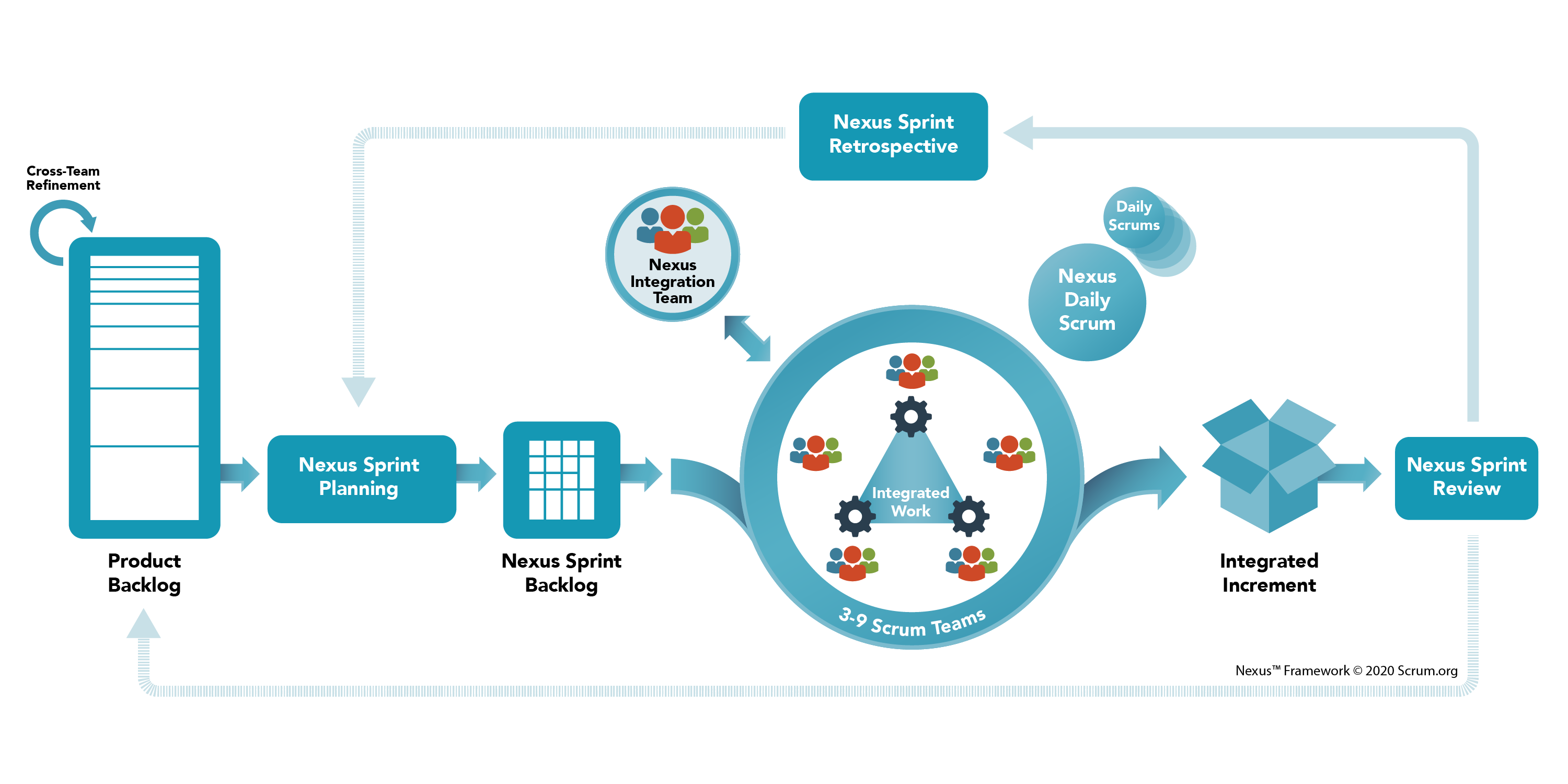
A Nexus is a group of approximately three to nine Scrum Teams that work together to deliver a single product; it is a connection between people and things. A Nexus has a Single Product Owner who manages a single Product Backlog from which the Scrum Teams work.

The Nexus framework defines the accountabilities, events, and artifacts that bind and weave together the work of the Scrum Teams in a Nexus. It minimally extends the Scrum framework only where absolutely necessary to enable multiple teams to work from a Single Product Backlog to build an Integrated Increment that meets a goal.

The Nexus Framework helps teams solve common scaling challenges like reducing cross-team dependencies, preserving team self-management and transparency, and ensuring accountability. 

  • Nexus helps to make transparent dependencies. 
  • Nexus provides opportunities to change the process, product structure, and communication structure to reduce or remove these dependencies.
Nexus Accountabilities

  • Nexus Integration Team. The Team is accountable for ensuring that a done Integrated Increment (the combined work completed by a Nexus) is produced at least once a Sprint. 
    • It provides the focus that makes possible the accountability of multiple Scrum Teams to come together to create valuable, useful Increments, as prescribed in Scrum.
    • Integration includes addressing technical and non-technical cross-functional team constraints that may impede a Nexus’ ability to deliver a constantly Integrated Increment.
    • It should use bottom-up intelligence from within the Nexus to achieve resolution.
  • The Product Owner
    • A Product Backlog has a single Product Owner who has the final say on its contents. 
    • The Product Owner is accountable for maximizing the value of the product and the work performed and integrated by the Scrum Teams in a Nexus. 
    • Is accountable for effective Product Backlog management.
  • A Scrum Master
    • The Scrum Master in the Nexus Integration Team is accountable for ensuring the Nexus framework is understood and enacted as described in the Nexus Guide. 
    • This Scrum Master may also be a Scrum Master in one or more of the Scrum Teams in the Nexus.        
  • One or more Nexus Integration Team Members
    • Scrum Team members who help the Scrum Teams to adopt tools and practices that contribute to the Scrum Teams’ ability to deliver a valuable and useful Integrated Increment that frequently meets the Definition of Done.

Nexus Events 

Nexus adds to or extends the events defined by Scrum. 

  • The duration of Nexus events is guided by the length of the corresponding events in the Scrum Guide. They are timeboxed in addition to their corresponding Scrum events.
  • It may not be practical for all members of Nexus to participate to share information or come to an agreement. Except where noted, Nexus events are attended by whichever members of the Nexus are needed to achieve the intended outcome of the event most effectively.
  • The Sprint. A Sprint in Nexus is the same as in Scrum.
  • Cross-Team Refinement. Reduces or eliminates cross-team dependencies within a Nexus. 
    • The Product Backlog must be decomposed so that dependencies are transparent, identified across teams, and removed or minimized. 
    • Product Backlog items pass through different levels of decomposition from very large and vague requests to actionable work that a single Scrum Team could deliver inside a Sprint.
    • The frequency, duration, and attendance of Cross-Team Refinement vary.
    • Where needed, each Scrum Team will continue its own refinement in order for the Product Backlog items to be ready for selection in a Nexus Sprint Planning event. 
  • Nexus Sprint Planning. Coordinates the activities of all Scrum Teams within a Nexus for a single Sprint. Appropriate representatives from each Scrum Team and the Product Owner meet to plan the Sprint. The result of Nexus Sprint Planning is:
    • A Nexus Sprint Goal that aligns with the Product Goal and describes the purpose that will be achieved by the Nexus during the Sprint
    • A Sprint Goal for each Scrum Team that aligns with the Nexus Sprint Goal.
    • A Single Nexus Sprint Backlog that represents the work of the Nexus toward the Nexus Sprint Goal and makes cross-team dependencies transparent
    • A Sprint Backlog for each Scrum Team, which makes transparent the work they will do in support of the Nexus Sprint Goal.
  • Nexus Daily Scrum. The purpose is to identify any integration issues and inspect progress toward the Nexus Sprint Goal. 
    • Appropriate representatives from the Scrum Teams attend the Nexus Daily Scrum, inspect the current state of the integrated Increment, and identify integration issues and newly discovered cross-team dependencies or impacts. 
    • Each Scrum Team’s Daily Scrum complements the Nexus Daily Scrum by creating plans for the day, focused primarily on addressing the integration issues raised during the Nexus Daily Scrum.
  • Nexus Sprint Review. It is held at the end of the Sprint to provide feedback on the done Integrated Increment that the Nexus has built over the Sprint and determine future adaptations.
    • The Nexus Sprint Review replaces individual Scrum Team Sprint Reviews
  • Nexus Sprint Retrospective. The purpose is to plan ways to increase quality and effectiveness across the whole Nexus. 
    • The Nexus inspects how the last Sprint went with regards to individuals, teams, interactions, processes, tools, and its Definition of Done.
    • In addition to individual team improvements, the Scrum Teams' Sprint Retrospectives complement the Nexus Sprint Retrospective by using bottom-up intelligence to focus on issues that affect the Nexus as a whole.

Nexus Artifacts

  • Product Backlog. There is a single Product Backlog that contains a list of what is needed to improve the product for the entire Nexus and all of its Scrum Teams. At scale, the Product Backlog must be understood at a level where dependencies can be detected and minimized.
    • Commitment: Product Goal - The Product Goal, describes the future state of the product and serves as a long-term goal of the Nexus.
  • Nexus Sprint Backlog. It is the composite of the Nexus Sprint Goal and Product Backlog items from the Sprint Backlogs of the individual Scrum Teams. It is used to highlight dependencies and the flow of work during the Sprint. The Nexus Sprint Backlog is updated throughout the Sprint as more is learned. It should have enough detail that the Nexus can inspect their progress in the Nexus Daily Scrum.
    • Commitment: Nexus Sprint Goal. It is a single objective for Nexus. 
  • Integrated Increment. It represents the current sum of all integrated work completed by a Nexus toward the Product Goal. The Integrated Increment is inspected at the Nexus Sprint Review but may be delivered to stakeholders before the end of the Sprint. 
    • The Integrated Increment must meet the Definition of Done.

Share:

The Scrum Framework

The Scrum framework is defined in The Scrum Guide and was introduced as a better way of team collaboration for solving complex problems. The Scrum framework is fairly simple being made up of a Scrum Team consisting of a Product Owner, a Scrum Master, and Developers, each of which has specific accountabilities. 

The Scrum Team takes part in five events and produces three artifacts. The Scrum Guide contains the definition of Scrum,  describing the Scrum accountabilities, events, artifacts, and the guidance that binds them together.

Scrum Accountabilities 

  • Scrum Master: The person on the Scrum Team who uses their knowledge of Scrum to help the team and organization to be as effective as they can be; they do so by taking approaches like coaching, teaching, facilitating, and mentoring
  • Product Owner: The person on the Scrum Team who makes sure that the team is creating the most valuable product they can create.
  • Developers - the people on the Scrum Team who work together to create the product.

Scrum Events

  • Sprint: Short cycles of one month or less, during which the work is done; the Sprint contains all of the other Scrum events; a new Sprint starts immediately after the conclusion of the previous Sprint
  • Sprint Planning: The event is dedicated to planning out the work that will take place during the Sprint
  • Daily Scrum: The event is held every day where the Developers inspect the progress toward the Sprint Goal, uncover anything that may be getting in their way and adapt accordingly
  • Sprint Review: The event is held at the end of the Sprint where the Scrum Team and key stakeholders review what was accomplished in the Sprint and what has changed in their environment; next, attendees collaborate on what to do next
  • Sprint Retrospective: The Scrum Team gets together during this event to talk about how the last Sprint went and identify the most helpful changes to improve their effectiveness

Scrum Artifacts

  • Product Backlog - an evolving, ordered list of what is needed to improve the product; it is the single source of work undertaken by the Scrum Team
    • Commitment: Product Goal -  the target the team plans against 
  • Sprint Backlog - a highly visible list of work that is the Developer’s plan for Sprint, which may evolve as they learn
    • Commitment: Sprint Goal - the single objective of the Sprint
  • Increments - small pieces of work that serve as concrete stepping stones toward the Product Goal. You can deliver as often as needed during the Sprint and are not limited to only one release per Sprint.
    • Commitment: Definition of Done -  the description of what it takes for an Increment to be considered complete

References

Share:

The Kanban Method

With Kanban, you can manage work. It is a method to manage all types of professional services, also referred to as knowledge work.

Using the Kanban method means applying a holistic way of thinking about your services with a focus on improving them from your customers' perspective.

Kanban is not a methodology nor a process framework. Rather, it is a management method or approach that should be applied to an existing process or way of working.

STATIK

The STATIK approach should be applied to each service. It will result in a full Kanban system design. Throughout the process, systems thinking should be applied. The (future) system is always considered as a whole, with the goal of improving the flow of value to customers.

Kanban Boards

Kanban boards are the most common means of visualizing a Kanban system. 
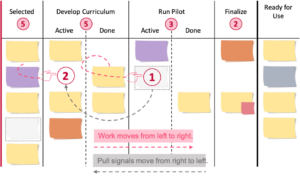
  • Common to all boards is pulling work from left to right through the board: on the left, new work items enter the board. When they exit on the right, value is delivered to customers.
  • There is at least one clear commitment and delivery point and a representation of the permitted amount of work (Work in progress, WIP).
  • Work Items can be of different types and sizes, from tasks to requirements, types of artifacts, (groups of) product features and topics to projects or product packages on higher-level boards.
  • Work items are typically displayed on individual (paper) notes, which are usually called cards or tickets.
  • The series of activities these work items go through is referred to as Workflow. Kanban is based on the "Start where you are now" approach, so, the actual workflow (not a wishful future image) is being modeled on the Kanban board.
  • The individual steps in the workflow and buffers are shown in columns.
  • Lanes are often used for different work types, projects, etc. to distribute capacity.
  • The workflow is modeled on the board. Different colored notes can be used, for example, to represent different types of work items.
  • The flow of work and its risks should be realistically shown in their true current state rather than a wishful image of the future at all times.

WIP Limits and Pull

The so-called WIP limit, i.e., the maximum number of work items allowed at a time, can be defined per work state(s), per person, per lane, per type of work, for a whole Kanban system, etc. WIP limits are typically represented by a number in a circle, above the respective columns.
  • Limiting the work that is allowed to enter the system is an important key to reducing delay and context switching which may result in poor timeliness, quality, and potential waste.
  • The aim is to create a balance between demand and capability over time.
  • Limiting the work that is allowed to enter the system also creates a continuous flow of work in which drawing or "pulling" work only happens if there is capacity. 
  • A virtual pull signal is generated when the WIP limit is not fully utilized. While work on the board moves to the right, pull signals move to the left, further upstream.

Core Kanbas Metrics

  • Lead time is the time it takes for a single work item to pass through the system from the start (commitment point) to completion.
  • Delivery rate is the number of completed work items per unit of time, such as features per week, training classes per month, or new hires per month.
  • WIP (work in progress) is the number of work items in the system (or a defined part of it) at a certain point in time.
  • Cumulative flow diagram (CFD). It is useful information regarding the flow of work across multiple activities. The colored areas in the diagram represent the number of work items within a particular activity in the workflow and how these work items move across all activities, from top to bottom, over time until done.

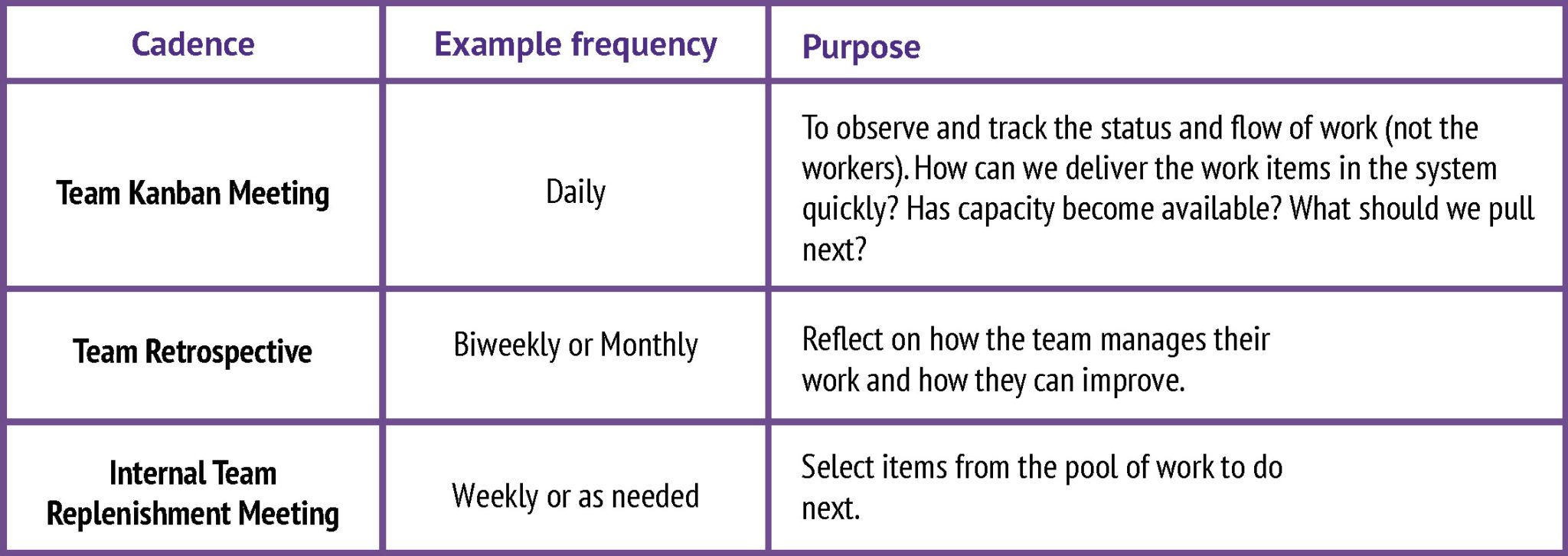
Kanban Cadences

Please note that like all elements of a Kanban implementation, the cadences can and should be set up to it within the given organizational context. In practical terms, this means:

  • Identify existing meetings and reviews that already serve a similar purpose and continually evolve them.
  • Keep the existing names or use the standard cadence naming or come up with something else. It is the purpose that matters.
  • Pick the frequency and duration based on your context. In many cases, having more frequent but shorter meetings over time increases agility.

References

Share:

The eXtreme Programming Method

The Rules of Extreme Programming

References

Share:

The 6 Types of Socratic Questions

1. Clarifying Thinking and Understanding

Get them to think more about what exactly they are asking or thinking about. Prove the concepts behind their answer or argument. Use basic "tell me more" questions to get deeper.

  • "Can you give me an example?"
  • "Can you explain further?"
  • "Are you saying..."
  • "What is the problem you are trying to solve?"

2. Challenging Assumptions

  • "Is that always the case?"
  • "Are you assuming...?"
  • "How can you verify or disprove that?"
  • "What would happen if?"

3. Examine Evidence & Rationale

  • "Why do you say that?"
  • "How do you know?"
  • "Why?"
  • "What evidence is there that supports..."

4. Considering Alternative Perspectives

  • "Are there any alternatives?"
  • "What is the other side of the argument?"
  • "What makes your viewpoint better?"
  • "Who would be affected and what would they think?"

5. Considering Implications and Consequences

  • "What are the implications/consequences of...?"
  • "How does that affect....?"
  • "What if you are wrong?"
  • "What our experience tells us will happen?"

6. Meta Questions

  • "Why do you think I ask that question?"
  • "What does... mean?"
  • "What is the point of the question?"
  • "What else might I ask?"

References

Share:

The Business Model Canvas

What is the Business Model Canvas?

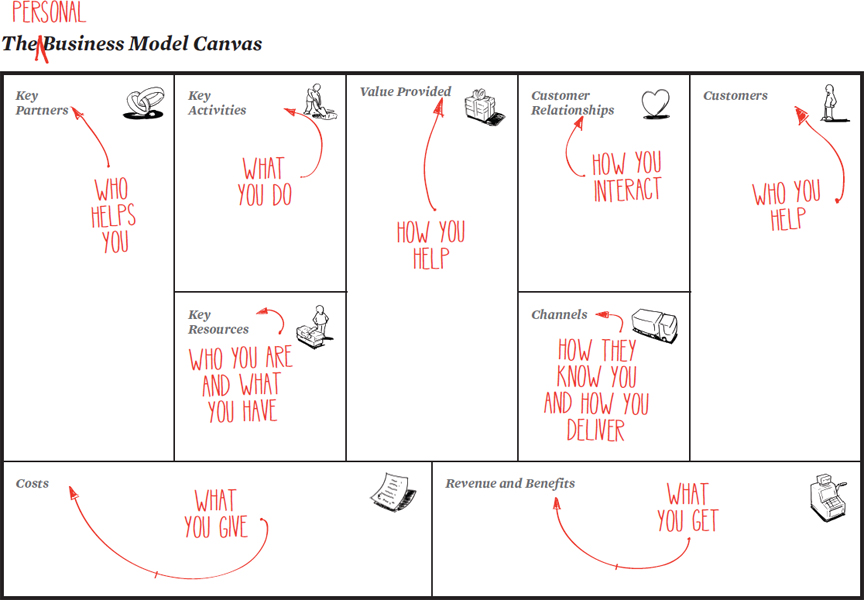
The Business Model Canvas (BMC) is a strategic management tool to quickly and easily define and communicate a business idea or concept.

  • The right side of the BMC focuses on the customer (external), while, the left side of the canvas focuses on the business (internal). 
  • Both external and internal factors meet around the value proposition, which is the exchange of value between your business and your customer/clients.

Value Proposition

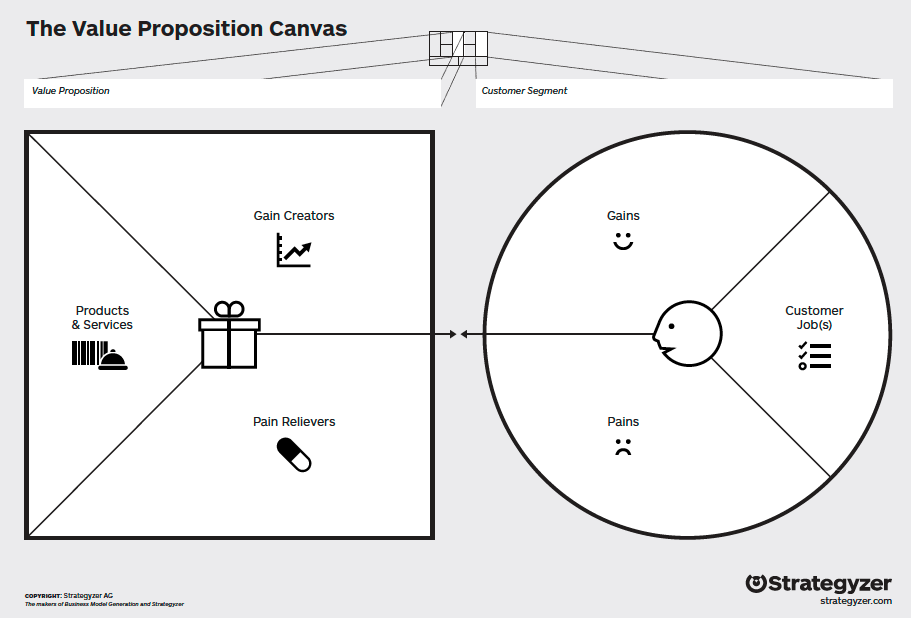
It is the fundamental concept of the exchange of value between your business and your customer/clients.
  • Value Proposition is the value exchanged from a customer for money when a problem is solved or pain is relieved for them by your business.
  • It is important to have context around the goals the company is trying to achieve for its Customer Segments and where your business/product/service fits in the value chain.
Good questions to ask when defining your business/product:
  • What is the problem I am solving?
  • Why would someone want to have this problem solved?
  • What is the underlying motivator for this problem?

Customer Segments

Customer Segmenting is the practice of dividing a customer base into groups of individuals that are similar in specific ways, such as age, gender, interests, and spending habits.

Things to consider when determining your Customer Segments:
  • Who are we solving the problem for?
  • Who are the people that will value my value proposition?
  • Are they another business?
  • If so, what are the characteristics of those businesses?
  • Or, are they other people?
  • Does my value proposition appeal to men/women or both?
  • Does it appeal to young adults aged 20 to 30 or teenagers?
  • What are the characteristics of the people who are looking for my value proposition?
To continue...

References

Share: