The Disciplined Agile Delivery Framework

Disciplined Agile® Delivery (DAD) is a people-first, learning-oriented hybrid agile approach to IT solution delivery. DAD addresses all aspects of the full delivery life cycle, supporting multiple ways of working (WoW) that can be tailored to the context that you face. DAD encompasses all aspects of agile software development in a robust, pragmatic, and governable manner.

Roles

  • Primary Roles. These roles are commonly found on DAD teams regardless of the level of scale faced by the team.
    • Stakeholder. Is someone who is materially impacted by the outcome of the solution. In this regard, the stakeholder is clearly more than an end-user.
    • Team Member. The role of the team member focuses on producing the actual solution for stakeholders (a.k.a. Developer in Scrum).
    • Team Lead. Servant leader of the team, creating and maintaining the conditions that allow the team to be successful. The team lead is also an agile coach, helping to keep the team focused on delivering work items and fulfilling their iteration goals and commitments that they have made to the product owner (a.k.a Scrum Master).
    • Product owner. Is the one individual on the team who speaks as the "one voice of the customer." He or she represents the needs and desires of the stakeholder community to the agile delivery team. As such, he or she clarifies any details regarding the solution and is also responsible for maintaining a prioritized list of work items that the team will implement to deliver the solution.
    • Architecture Owner. Is the person who owns the architecture decisions for the team and who facilitates the creation and evolution of the overall solution design. The person in the role of team lead will often also be in the role of architecture owner on small teams.
  • Supporting Roles. These are typically introduced, often on a temporary basis, to address scaling issues
    • Specialist. Although most agile team members are generalizing specialists, sometimes, particularly at scale, specialists are required.
      • For example, on large teams or in complex domains one or more agile business analysts may join the team to help you to explore the requirements for what you’re building.
    • Domain Expert (or subject matter expert). The product owner represents a wide range of stakeholders, not just end users, so it isn’t reasonable to expect them to be experts in every nuance in your domain, something that is particularly true with complex domains.
    • Technical Expert. Sometimes the team needs the help of technical experts, such as a build master to set up their build scripts, an agile database administrator to help design and test their database, a user experience (UX) expert to help design a usable interface, or a security expert to provide advice around writing a secure system.
    • Independent Tester. Although the majority of the testing is done by the people on the DAD team themselves, some DAD teams are supported by an independent test team working in parallel that validates their work throughout the life cycle.
    • Integrator. For large DAD teams which have been organized into a team of sub-teams, the sub-teams are typically responsible for one or more subsystems or features. The larger the overall team, generally the larger and more complicated the system being built. In these situations, the overall team may require one or more people in the role of integrator responsible for building the entire system from its various subsystems.

Notes about roles:

  • On a DAD team, any given person will be in one or more roles, an individual can change their role(s) over time, and any given role will have zero or more people performing it at any given time. 
  • Roles are not positions, nor are they meant to be.

Full Delivery Life Cycles

DAD, because it’s not prescriptive and strives to reflect reality as best it can, actually supports several versions of a delivery life cycle. Six versions of the life cycle are supported

Share:

The Lean Coffee Meeting

Lean Coffee is structured, but agenda-less meeting. Participants gather, build an agenda, and begin talking. Conversations are directed and productive because the agenda for the meeting was democratically generated. 

Step by Step

  • Step 1. Set up a Personal Kanban
    • It keeps the items to discuss, what we are currently discussing, and the discussed columns. 
    • This provides a structure for the conversation. 
    • People all get pads of post-it notes and a pen. 
  • Step 2. Brainstorm Topics.
    • They then start to add their topics for conversation into the "to discuss" column. 
    • These can be literally whatever people want to discuss or follow a theme. 
    • Right now, we want to encourage as many unique ideas as we can.
  • Step 3. Pitch Your Topics.
    • When the ideas start to reach a certain point (and you’ll be the best judge of when that is), each topic gets a 1 to 2-sentence introduction. 
    • This way people know what to vote for.
  • Step 4. Prioritize What to Discuss.
    • Each participant gets two votes. 
    • You can vote twice for the same thing or for two different topics. 
    • Simply put a dot on the sticky you are interested in. Tally the dots. 
  • Step 5. Manage the Flow of the Conversation.
    • Then you are ready to have a conversation.
  • Step 6. Identify Next Steps.
    • Record actions, ideas, and next steps.

References

Share:

The UnFix Model


What unFIX is Not

  • The unFIX model is NOT a framework. There is nothing essential in unFIX. Everything is optional. A better description would be a pattern library.
  • The unFIX model offers NO processes. The purpose of unFIX is to cover only organization design patterns and organizational structure. It is easy to find great advice for processes from many other sources.
  • The unFIX model is NOT for IT only. 
  • The unFIX model is NOT top-down. unFIX suggests a bottom-up approach. You cannot build something large. You must begin with something small.
  • The unFIX model is NOT a replacement. There are plenty of good things in other models and frameworks that should not be thrown away. We just hope that, with unFIX, you will unfix the bad parts and keep all the good bits.

The audience for unFIX is small to medium-sized businesses, not limited to software but it can be scaled up.

The Base (Tribe, Clan, Business Unit)

All Crews operate from a Base of between a handful to a few hundred people.

  • This Base has a number of Crews of the seven standard Crew types organized around one or more value streams.
  • The Base acts like a fully grown, independent business.
  • It contains all the necessary skills to design, develop, and deliver products, from Design Thinking to DevOps and Lean Startup to Lean Manufacturing.

Every person has a Base. It is their home.

  • The Base offers its people a sense of purpose, belonging, and recognition.
  • It provides comfort, personal safety, connectedness, a shared culture, shared toolsets, and career opportunities for all its workers.

Ideally, the Base covers a customer domain, not a technical domain.

  • It is similar to a tribe in the Spotify model and an Agile Release Train (ART) in the Scaled Agile Framework (SAFe). However, cadence and synchronization of work are optional.
  • A critical job of the Base is to continuously reorganize itself depending on the needs of the customer experience.
  • When the architecture needs to change, the organization needs to change.
  • Therefore, the Base does everything it can to support its Crews in remaining flexible.
  • This includes taking care of minimum standards and rules across all Crews so that reteaming is as painless as possible.

Crews (Team, Squad, Pod, Cell)

A Crew is a team that usually consists of three to seven people. 

  • The optimum team size is five. 
  • Team members are mostly dedicated to their Crew, but it’s okay if they reserve a small part of their week for work on a Forum (see below). 
  • In a regular business, most Crews should probably be Value Stream Crews. 
  • Crews can be any of the seven standard types.
  • These self-organizing, cross-functional teams manage their own meetings (planning, check-in, review, and retros); they manage their own documentation and releases, and they may operate according to a team agreement that defines team identity, shared rules, and more. 

There are seven kinds of Crews:

There are several team options:

  • Steady Team (high permanence, low permeability). The team is long-lived, and team membership changes rarely (e.g.: product team).
  • Dynamic Team (high permanence, high permeability). The team itself is long-lived, but team membership changes frequently (e.g. a call center).
  • Mission Team (low permanence, low permeability). The team itself is short-lived, but team membership changes rarely (e.g. rescue team, project teams).
  • Liquid Team (low permanence, high permeability). The team itself is short-lived, and team members also change frequently (e.g. film crew or construction crew).

The best teaming option depends on how the benefits and drawbacks of each pattern play out for your organization

The Forum (Chapter, Guild, Council, or CoP)

All value stream work happens in the Crews, but some things within the Base need to be coordinated along functional lines. A Forum is a group consisting of people from various Crews. 

  • Its primary purpose is for like-minded workers to get together, talk, and make decisions together
  • There could be a DevOps Forum, a UX Forum, a Growth Hackers Forum, etc. 
  • In traditional organizations, the Project Management Office (PMO) could be turned into a Forum.
  • In agile companies, the Product Managers could have their own Forum
  • The Chiefs of the Base might decide which Forums are needed because some Forums play an essential role in the organization's structure.

Chiefs can delegate work to Forums, such as standardization, templates, toolsets, infrastructure, personal development, cross-team coordination, and so on. 

  • They can expect each worker in the Base to be a member of at least one Forum and to participate in the conversations and decisions that matter for their functional areas. 
  • The role of Forums is to be the connective tissue between the Crews.
  • The purpose of a Forum is for people in similar roles to agree on how the work is done within the Base in a self-organized way so that dynamic reteaming is as painless as possible.

Some examples of Forums:

The Turfs (Area, Territory)

The Turfs are areas cultivated and protected by the same people. It could be a codebase, a product area, a machine, a house, or a town district that one group of people collectively takes care of.

  • The Turf is an area of concern with a clearly defined boundary.
  • There is clarity of ownership and responsibilities regarding the Turf.
  • The Turf is not too large; people are able to maintain and cultivate it.
  • The Turf is not too small; it offers enough challenge and motivation.

The Turf has significant relevance because of the maintenance drag. If the Turf that a group of people is responsible for gets too large, they will struggle to maintain it. 

The Captain (Team Lead)

There is a need for one Crew member to act as its Captain.

  • This person is the primary contact for the outside world, and she has final responsibility for whatever happens on the journey. 
  • A Crew can have a few additional roles, such as Product Lead, Tech Lead, etc. Depending on the product and its dependencies on the outside world, different Crew members can manage other communication channels. 
  • In fact, each Crew member could be a "lead" in some area. 
  • The link with the Base (see below) is the Captain.
  • Captains can be appointed, or they can be elected. 
  • However, the Captain never has line management responsibility on a Crew. 
    • The Captain does NOT discuss career development, compensation, or promotions with her crew members. 
    • Either way, she is the manager of the journey, not the Crew members!

The Chiefs (Management Team)

The Chiefs have line management responsibility for everyone in their Base. They are, literally, the management team

  • Depending on how the Chiefs divide the roles, each of them would have between three to twenty direct reports. 
  • Typically, all back-end developers would report to a Chief Technology, and all UX people might report to a Chief Product, and so on. But context should dictate what is reasonable.
  • The Base has a stable management reporting structure, no matter what happens with the Crews. People could hop from Crew to Crew five times per year, and nobody would ever change their manager.
  • Only the Chiefs are responsible for recruitment, compensation, promotions, and so on. 
  • They can delegate the value streams to the Captains of Crews and functional alignment to the Chairs of Forums (see below).

The Chair (Moderator)

The Chair is the manager of the Forum and NOT the manager of the people.

  • The person who moderates a Forum has responsibility for the workings of the Forum. 
  • He is not the manager of the people who participate in the Forum. 
  • It is a part-time job, typically taken up by someone with some seniority in the Base. 

The unFIX model is not a matrix organization. 

  • Different Crew members participate in different Forums, and they may have different Chiefs as managers. 
  • The Chiefs always work on the same Governance Crew. The managers have the same objectives. 
  • When there’s a conflict on a Crew, it can escalate to only one management team! Goodbye matrix.

Scaling Up

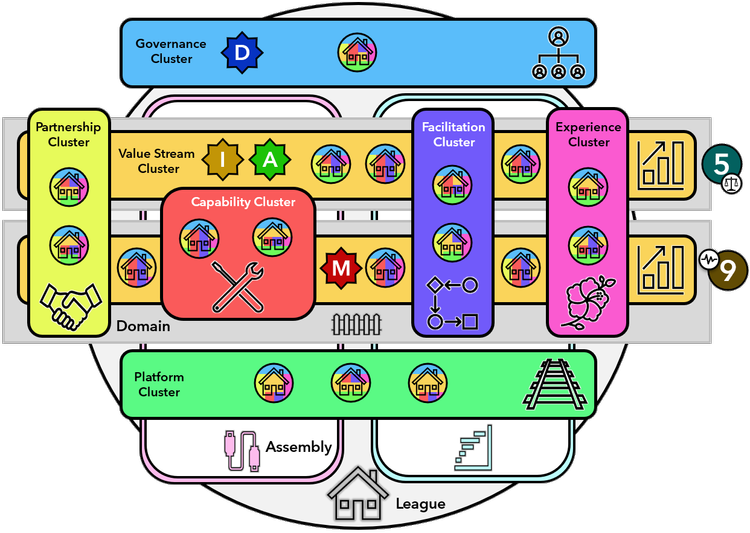
Dozens of Bases can collaborate in a League.

  • Within a League, they might form Clusters (similar to people forming Crews). 
  • Some Bases could self-organize into a Value Stream Cluster, others into a Facilitation Cluster, a Platform Cluster, a Capability Cluster, etc. 
  • The League has its own management team (Governance Cluster) and is organized around co-dependent value streams or related customer experiences.

Similarly, cross-Base coordination can be handled in Assemblies (similar to people coordinating their work in Forums). 

  • These Assemblies are voluntary structures that enable the representatives from Bases to coordinate ways of working across the borders of a single Base.

We can even go another level up and say that dozens of Leagues might form a Crowd

  • The Leagues could self-organize and collaborate in Coalitions and coordinate their work in Congresses. 
  • Again, all earlier patterns repeat at the higher levels which makes the unFIX model self-similar across all scales. It is a fractal model.

Others

References

Share:

Meetings Distractions

Check-in

A check-in is a simple go-around that occurs at the beginning of a meeting. People are invited to share their moods and briefly identify anything that might affect their participation. Check-ins allow people to tell each other what they are facing, in a way that informs without being intrusive.

  1. Introduce the check-in and say "What mood are you in? any context is fine, work-related or not" and explain "Let's give each person space to check in without comments". 
    • In essence "Here's how it feels to be me today"
  2. Ask for a volunteer to go first and ask this person to say "I'm done/Pass" when they have finished.
  3. If someone interrupts, politely interject and say"Sorry, excuse me, this is not a time for a conversation. Let's give each other space to check in without a comment"
  4. When everybody has checked in, you might optionally acknowledge a theme you've just heard. "It seems many of you ... [reassure any support from the meeting agenda or setting to help with the theme]"

Checking helps to be patient someone is having a bad day, and to transition from outside of the meeting to the inside of the meeting. It's a solid investment in the long-term development of trust.

Handling Out-of-context Distractions

Current events sometimes interfere with a group's ability to concentrate. Realistically the presence of a serious distraction will lower a group's efficiency regardless of what group members are officially allowed to talk about. This activity gives people the chance to spend a well-structured period of time talking about what's really on their minds. After a round of expressing themselves, they are better able to concentrate.

  1. Say "I notice we're having a hard time concentrating on this subject, and I'm aware that Z is on a lot of people's minds. Could we step back and speak for a few minutes talking about Z?".
  2. Make an agreement with the group to proceed.
  3. Make a reaction round with the question "What are people feeling about the event?" and get everybody the opportunity to express it.
  4. Make a suggestion for a transition: "What if we spend a few more minutes in this conversation, then take a break and return to the main topic after the break?"

Stepping out of the Content

Meetings sometimes get bogged down for reasons that aren't clear.

  1. Describe what you are observing. "This morning everyone agreed not to interrupt while they are speaking. Yet this afternoon many people are talking over one another. I am also noticing some other signs of stress, such as X, Y, Z"
  2. Ask for validation: "Is anyone also noticing this?" or "Are others seeing something similar?"
  3. Encourage reflection "What reaction are people having to this?" or "What thoughts and feelings are coming up for you?" or "Does anyone have a sense of what this is about?"
  4. Encourage and draw out different perspectives. Don't try to solve a bring people to a shared agreement.
  5. When people seem ready to return to the original topic, ask "Before we go back to our original topic, are there any final reactions to what has just been said?"
  6. Optional: call for a short break to let the planner(s) reconsider the agenda.

Continuous improvement

  1. Hang two sheets of paper. Title one page "Strengths" and the other "Improvable".
  2. Ask somebody to someone to call out strength and. Then Ask someone else to call out an improvable. Build the two lists simultaneously.
  3. Encourage participants to speak frankly in the spirit of constructive learning.
  4. While the lists are being made, the ground rule of suspending judgment is in effect - no defending, explaining, or apologizing.

References

Share:

Meeting Goals


The overall goal of a project may take several meetings to achieve. Each meeting can be seen in its own terms, a context within which the group can progress towards the overall goal by achieving two or three narrow meeting goals.

Meetings goals are specific, well-defined, and realistic designed to be achieved in the time frame of a single meeting. There are seven types of meeting goals.

Meeting Goal 1 - Share Information

When someone makes an announcement, a report, or a presentation, their meeting goal is to share information. The audience becomes the end-users of that information.
  • Meeting planners who understand this can build in opportunities, like quick conversations in pairs, for members to digest what they are hearing, so they can apply it when and how they need to.  
  • A typical string of activities:
    • Activity 1 - Presentation.
    • Activity 2 - Pairs
    • Activity 3 - Questions/Structure Go-around/Individual writing.
    • Outcome: The information is digested.

Meeting Goal 2 - Provide Input

When someone brings a topic to the group for feedback or suggestions and they want comments and not decisions from the group.
  • When participants realize they are asked for just input then they can focus on influencing the presenter and not the other meeting participants.
  • When participants mistakenly think they are invited to decision-making, they put the effort into critiquing and debating with the hope of creating support for their ideas, and often become frustrated and demoralized.

Meeting Goal 3- Advanced Thinking

Most projects involve several stages, and normally many steps of thinking are embedded in each step. Yet progress usually entails taking one step at a time.
  • Meeting planners can become more precise in setting realistic and useful meeting objectives.
  • The group members must understand the objective clearly to think and not mistake the goal.
  • Example: Define the Problem, Analyze the Problem, Identify Root Causes, Identify...

Meeting Goal 4 - Make Decisions

When a meeting planner wants a group to address an issue and make a decision. There are easy and difficult decisions. 
  • What is the decision rule we will use to take the decision?
  • People who have to decide on tough issues are more likely to feel compelled to build a shared understanding of the complexity involved.

Meeting Goal 5 - Improve Team Communication

When the meeting planner wants to strengthen the working relationships among members of the group by sharing feelings and dealing with interpersonal tension.
  • Take the group members from their task-related issues, to talk instead about their feelings and their relationships with one another.
  • It takes a skillful, well-planned approach - first to create a safe, supportive foundation, and then gently nurture self-disclosure and interpersonal feedback. 

Meeting Goal 6 - Build Team Capacity

When the planner wants to help the team to learn or improve something as a team. 
  • Some examples are problem-solving, decision-making, increase knowledge of major trends in the team's industry, and acquisition of methods, or best practices. 

Meeting Goal 7 - Build Community

When the meeting planner wants to improve camaraderie, strengthen the bonds among people who work together, or boost morale.
  • Time achievements and life events (like birthdays) can take place within 5-10 minutes.
  • Volunteer as a group, share reactions to momentous current events, and do simple creative energizers.

References

Share:

Facilitating Open Discussion

Open Discussion is the most common of all the formats for thinking in groups. Every person talks from their own personal frames or reference. But without strong facilitation, an open discussion can become tedious. frustrating and ultimately non-productive.

The Thefacilator challenge is to produce harmony among individual different perspectives.

Introducing the Open Discussion

Here is an example of an effective introduction.

We are here to spend half an hour in open discussion.
My intention is to support a free-flowing interchange while looking for ways to give everyone opportunities to speak when they want to.
If more than one person wants to talk at the same time, I'll ask you to rise your hand and I will number you off. 
That way, you will know when your turn is coming and you do not have to keep weaving your hand to get my attention.
If someone makes a statement that produces immediate reactions, I might take a few comments from people who weren't in line, to speak. 
But I'll do that only when it's an obvious choice and if I do let anyone take a cut, I will definitely return to those who were in line

Stacking

It helps hierarchical groups to make room for all members. It works fine with 3 - 4 participants.

  1. Tell the group: "Raise your hand if you would like to speak."
    • I will temporarily interrupt the stack if there is a sudden burst of energy.
  2. Before anyone is speaking, assign a number to each person: "You are first", "You are second",...
  3. Invite the first person to begin.
  4. When that person finished, call on the other person next in line, "How was second?"
  5. After the stack is complete, begin the next stack by asking "Does anyone else want to speak? if so please raise your hand now."

Allowing spontaneous reactions: "I am going to take a few responses to this last comment. For those of you who are already in line to speak, don't worry. I won't forget you. I will definitely to the designated speaking order soon."

Sequencing

The facilitator sequences two conversations that are underway simultaneously, keeping the discussion focused without taking sides.

  1. Validate both perspectives.
    • "We appear to have two conversations going, simultaneously, some of you want to respond to Y, and at the same time, others of you would prefer to return to X."
  2. Focus on one line of thought for a few minutes.
    • "Here is what I'm going to do, I will take 2 or 3 more comments on the Y, and then I will ask to reintroduce the X topic."
  3. Shift to a different line of thought for the next few minutes.
  4. If necessary ask the group what to focus on next.
    • "Then if necessary, we can take stock to decide what's most important to focus on at that point."
Sequencing is not effective for managing more than two topic areas.

Calling for Responses

It is a method for preserving the focus of the discussion while encouraging participation from new speakers.

  • "Does anyone have a reaction to what N just said?"
  • "Does anyone have a question for the people who just spoke?"

Calling for responses is often perceived as neutral by the participants as long the facilitator is not in favor of one particular opinion.

Deliberate Refocusing

This is a directive method perceived as such by the participants. The best way to use it is to frame it as if it is a question.

  • "For the past N minutes, you have been talking about topic X. But some of you indicated you wanted the group to discuss topic Y too, is it now a good time to switch?"
  • "A while ago Jimmy raised the issue and no one responded. Before we lose that thought altogether, I just want to check, does anyone have a comment for Jimmy?"

Tracking

Valuable method to use when a discussion is at its most competitive and its most unruly, when people are least likely to listen to each other, or when everyone is intended to push individual agendas.

  1. Say to the group "I think we are discussing several issues at the same time, here they are..."
  2. Name each line of thought you are able to identify.
  3. Complete the list by asking the group "Have I captured all the themes?"
  4. Summarize: "Okay, you have N threads, each important to someone"
  5. Decide how to continue "Before another round, would you like to organize a sequence for focusing on the issues?"

Asking for Themes

The issues are identified by the group members rather than by the facilitator.

  1. Say to the group"You are discussing several issues all at the same time"
  2. Ask: "Can we pause a moment and list all the themes being discussed?"
  3. Record the themes as they are listed.
  4. When the list is complete say: "It's easier now to see the range of ways you are thinking about the subject, If necessary we can step back and prioritize topics. For the moment let's resume the discussion, who wants to talk?"

Framing

Gently step back from the content and remind the group of the purpose of the conversation.

  1. Begin by pointing out that several sub-conversations are underway.
  2. Say, "Let's remember how the discussion began"
  3. Restate the discussion's original purpose: "Originally we discussed X. The conversation has gone in different directions. Some might need to be persuaded it right now and maybe others can be deferred, which do you think are relevant?"
  4. Continue as if you had Asked for Themes (see above).

Switching from Open Discussion to Different Format

When a discussion becomes tedious and people appear to be restless or bored, the wisest choice might be to end the Open Discussion and switch to another format.

Share:

OpenSpace Technology with a Twist

OpenSpace Technology

Invented by Harrison Owen in 1985, OpenSpace Technology (OST) is an event format used in meetings of 5 to 2,000 people where the participants create the agenda for themselves and facilitators lead and record the resulting discussions.
  • To tackle a large number of the most important/difficult issues facing a large group of people.
    • Complexity (hard problems to solve)
    • Diversity (lots of different types of people needed)
    • Conflict (people really care about the issue)
    • Urgency (it has to be fixed as soon as possible)
  • To achieve shared ownership of not only the outcomes but also the process and the event itself.

Outcomes

  • All the most important issues to those attending are included in the agenda.
  • All the issues raised and worked on are addressed by the participants best capable of getting something done about them. 
  • All the most important ideas, recommendations, discussions, and next steps are documented in a resulting report.
  • When the purpose requires, and time allows for it, the group can prioritize the issues addressed in the report. 
  • When the purpose requires, and time allows for it, the group can draft action plans for the highest priority issues.

When not to use OST

  • When the problems aren’t complex enough. Easy-to-solve problems rarely invoke enough passion in participants and when you have large numbers of people not caring enough your event can fall flat.
  • When management has decided (or is close to deciding) the way forward. Almost anything can come out of an OpenSpace session and leadership must be willing to embrace whatever happens otherwise participants will feel their time has been wasted.
  • When the organization has a top-down autocratic culture. OpenSpace is extremely democratic by nature but for it to work well the participants need to feel their views are being taken seriously.
Share:

Governance Meetings in Holacracy

The focus of this meeting is to modify the structure of the circle. In a Governance meeting, you can:

  • Create, remove, or modify the roles of the circle.
  • Create, remove, or modify the policies of the circle.
  • Elect people to the elected core roles of the circle (Facilitator, Secretary, and Circle Rep).

1. Check-In Round

The Facilitator invites participants, one at a time, to share a check-in to call out distractions and get present. No discussion.

2. Build Agenda

Participants build the agenda of tensions to process, using one or two words per item as a reminder for the agenda item owner.

3. Process Agenda Items

Use the Integrative Decision-Making (IDM) process for each agenda item.

  • Presents the proposal.
    • The proposer states their proposal, optionally sharing their tension.
    • Others can help if the proposer asks, but only to craft an initial proposal, not improve it or reach a consensus.
  • Clarifying Questions.
    • Anyone may ask the proposer questions to better understand the proposal, but not to try to influence it. 
      • No discussion. No reactions. 
    • The proposer can respond “Not specified” to any question.
  • Reaction Round.
    • The Facilitator asks each participant (except for the proposer) for a reaction, one at a time. 
      • No discussion. Reactions are directed to the space, not to individuals.
  • Option to Clarify.
    • The proposer may clarify the intent or amend the proposal, but they have no obligation to do so. 
      • No one else may speak, not even to help.
  • Objection Round.
    • The Facilitator asks each participant (including the proposer):
      • "Do you see any reason why adopting this proposal causes harm, objection, or no objection?
    • Each objection is stated without discussion. 
      • The Facilitator may test objections.
  • Integration
    • Integrate one objection at a time. 
    • The goal is an amended proposal that removes the objection and addresses the proposer’s tension. 
    • Anyone can participate, but the focus should be on the proposer and the objector.
      • Start with the objector, but allow contributions from anyone. 
        • Ask the objector: "What can be added or changed to remove that issue?"
      • Don’t wait for consensus. With each idea:
        • Ask the objector, "Would this resolve your objection?" If the answer is "Yes," then ask the proposer, "Would this still address your tension?"
      • After all the objections are integrated, repeat the Objection Round.

    4. Closing Round

    The Facilitator invites each participant, one at a time, to share a closing reflection. No discussion.
    Share:

    Tactical Meeting in Holacracy

    Tactical meetings are focused on a team’s operational work. They are fast-paced forums to synchronize team members for the week and their purpose is to triage issues that have come up recently and remove obstacles so that the work can move forward. 

    Anything that can be done in a tactical meeting can also be done outside of it. Tactical meetings are a convenient opportunity for all circle members to come together to sync up on operational work. But waiting for a tactical meeting should never become a barrier to moving operational work forward.

    The formal outputs of tactical meetings are accepted projects and actions. The Secretary works with the Facilitator to capture this information (and nothing else!) as requests are made and circle members agree to take on projects and actions.

    • Projects: Specific outcomes that require multiple and/or sequential actions to complete. Projects are phrased in the past tense as in, “Budget report completed.”
    • Actions: A concrete step that could be taken immediately toward the completion of a project.

    1. Check-in Round

    Notice what's got your attention, call it out, and let it go.

    • Sacred space: no cross-talk.
    • Get present: here and now.

    2. Checklist Review

    Bring transparency to recurring actions.

    • The facilitator reads a checklist of recurring actions by role. 
      • Participants respond: "check" or "not check".

    3. Metrics Review

    Build a picture of the current reality.

    • Each role-assigned metric reports on it briefly, highlighting the latest data.

    4. Progress Updates

    Report updates to key projects of the circle.

    • The facilitator reads each project on the circle's project board and asks:
      •  "Any update?"
    • The project owner either responds with "no updates" or shares what has changed since the last meeting.
      • Questions are allowed but not discussion.

    5. Agenda Building

    Build an agenda with placeholder headlines.

    • Build agenda of tensions to process
      • One or two words per item, no discussion.

    6. Triage Issues

    Get through all agenda items in the allotted time. To resolve each agenda item:
    • The facilitator asks: "What do you need?", typically:
      • Request for Someone to Get Something Done.
        • Ask "What role would you like to request that from?". If unknown, ask others for help and/or ask the Secretary to pull up governance to investigate. 
        • Ask the recipient of the request, "Would it serve your role's purpose or  accountabilities to take that action or work towards that outcome?"
        • Watch for implicit expectations. If the request doesn't fit any role's purpose or accountabilities, ask "Is this something you'd like to expect on an ongoing basis?"
      • Request Data or Opinions from Others.
        • Encourage the agenda item owner to engage others directly.
        • Watch for a shift from surfacing information to seeking approval. Ask, "What role has authority to make a decision here?" or, "Is this a pattern to address in  governance?"
      • Request Others' Attention (i.e., Make an Announcement).
        • Check, "Did you get what you needed?" or clarify, "Do you want to make space for questions or reactions?" before allowing responses.
        • Watch for anything other than sharing information (e.g., an implicit request).
      • Request an Ongoing Expectation
        • Option A: Governance Tension.
          • If the new expectation is directly about the roles and policies of the circle, then explain that those expectations can only be defined in governance. Then ask, "Would you like a reminder to bring this into the governance process?" Also  ask, “Until then, is there anything operationally that needs to be done?
        • Option B: Relational Tension.
          • If the new expectation is about one’s general function as a partner (i.e., would apply regardless of role), then ask, "Would you like to request a new relational agreement?"
    • The secretary captures any next action or projects requested and accepted.
    • The facilitator asks: "Did you get what you need?"

    7. Closing Round

    Harvest learning from the meeting.
    • Each person can share closing reflections about the meeting. No discussion.

    Visual Management System

    Another key effective operation in Holocracy is the creation of a shared space where projects, checklists, and relevant metrics can be displayed and easily reviewed.

    Tips For Facilitation

    • If analysis or discussion feels overdone, ask:
      • "What next-actions are needed here?"
      • "So, what do you need? (to the agenda item-owner)
    • If people are seeking consensus or buy-in, ask:
      • "What role has the authority to make a decision here?"
      • "Do we need to clarify authorities in governance?"
    • If leaders are referenced by name:
      • "What role are you engaging here?"
    • If a border or recurring pattern needs to change, ask:
      • "Is this a pattern to address in governance?"
    • If someone is trying to see a new expectation, ask:
      • "Is that something you'd like to expect on an ongoing basis?, if so, Whould you like an action to bring that to governance?"

    References


    Share:

    Generative Decision Making Process

    A consent-based decision-making process built on the integrated decision-making method of Holocracy.

    1. Ripeness

    Is the time ripe for the decision? Is the context clear? Is there information needed to be gathered?

    • "I am going to put the timer on for 10 minutes while you explore the topic in question"
    • Listen deeply and when you sense that there is a possible proposal the time is ripe.

    2. Proposal Version 1

    Invite the group to volunteer to create a proposal.

    • "Would someone like to make an initial proposal?"
      • Help the proposer name the proposal.
      • The proposal is written for all to see not just the proposer.
    • Avoid letting the proposal spread into multiple proposals.

    3. Clarifications

    Opportunity to ask the proposer questions. 

    • The proposer has two options:
      • They provide the answer or
      • They say "Not specified" if the answer is unknown.
    • If someone is speaking without having a question:
      • Remind them it is a question period.
    • Avoid letting the proposer speak about anything other than giving a direct answer (keep it right).

    4. Reactions

    Give each person (except the proposer) the opportunity to express to the group their reaction to the proposal.

    • Everyone's voice and perspective need to be heard.
    • The proposer listens deeply and makes notes.
    • Afterward, the proposer will craft a new version of the proposal.
    • Make sure that the reaction is not about the proposer but about the proposal itself - step in if necessary.

    5. Proposal Version 2

    The proposer formulates a new version of the proposal in light of all that has been said.

    • Have the proposer write the new version and make sure it is visible to all:
      • Read it out loud.
    • If the proposer wants to stay with the original proposal:
      • Remind them they can.
    • If you sense the proposer needs support in formulating the second version: 
      • Remind them they can ask for help.

    6. Objections

    Ask for objections. An objection needs to express a risk or a backward movement for the organization or initiative.

    • Listen to the objection and decide if it is valid or not.
      • Sometimes people might express personal concerns that are not in fact organizational risks. You need to differentiate between the two.
      • If you are not sure, you may ask the group to help.
    • If it is valid:
      • Ask the proposer to integrate it into a new version of the proposal. 
      • Repeat the objection round.

    7. Visual Confirmations

    Have everyone visually confirm that they can live with this decision by raising their thumbs. This is a way of allowing all to see that everyone is fully on board with the decision.

    • If there is a concern that has not been raised, it will show up because a person will be unable to raise their thumb. This can happen when:
      • The person is struggling to find the words to express an idea that is important to them or
      • The person is disengaging from the process.
    • The concern needs to be addressed.
      • The group needs to return to the part of the process that was not fully addressed.

    Fast-tracking

    It is good to have a cultural cue as visual confirmation that a proposal may be fast-tracked.
    • Someone makes a proposal, and you can just do a quick check-in right away to see if everyone can live with it.

    References

    Share: